SMS for government has to be trusted: citizens should recognise the sender, every bulk message should be checked by a second person, and there should be a record of who sent what. In the eSMS dashboard an agency gets this with an official sender ID, campaign approval on every send, named team roles with two-factor sign-in, the audit log, and eSMS Verify for codes on citizen portals.
Last reviewed: 29 October 2026
What agencies send by SMS
- Documents and permits ready for collection (adapt the Ready for pickup template).
- Appointments at service centres (Appointment reminder).
- Deadlines for payments, renewals and registrations.
- Service disruptions and public notices, such as water or road closures and public meetings.
- One-time codes for online services, sent through eSMS Verify.
How to set up SMS for government agencies
Register the official sender ID
Under Sender IDs > Request sender ID, enter the name citizens know (up to 11 characters) and a clear use case. Use one official sender for all citizen messages so people learn to trust it.
Require approval on every campaign
In Settings > Messaging, switch on Require approval for campaigns and leave both thresholds empty: with no threshold, every campaign needs approval, and nobody can approve their own.
Create named logins with the right roles
Invite each officer under Settings > Team with their own email: communications staff as Sender, a supervisor as Approver, and auditors as Viewer. Never share one login. Ask everyone to turn on two-factor authentication at auth.esmsafrica.io/profile.
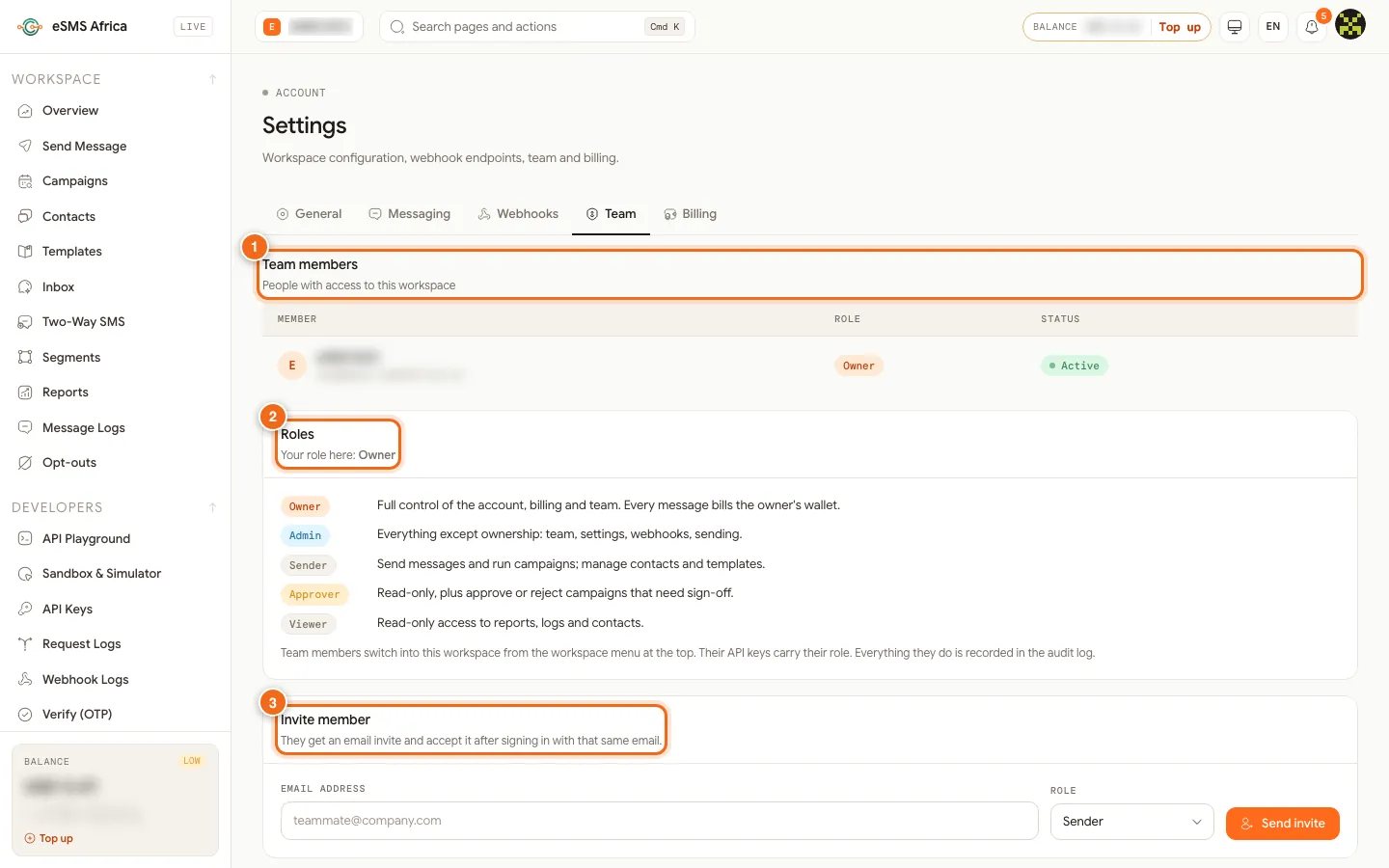
1 Team members table, 2 Roles explained, 3 Invite member. Prepare approved wording as templates
Save each standard notice under Templates so officers reuse wording that has already been cleared. Use merge fields for the reference number, date and office.
Send and schedule
Create the campaign, choose Transactional for service notices and deadlines, and schedule it. On Review & send, click Send test to me, then Submit for approval. The approver sees the recipients and estimated cost before clicking Approve.
Use Verify for citizen portals
For sign-in and confirmation codes on online services, use eSMS Verify; your developers can follow Send and check OTPs with eSMS Verify.
Keep the records
Export the Audit log and campaign reports each month. Together they show who prepared, approved and sent each message, who received it and what it cost.
Sample messages
Examples with a made-up county.
- Permit ready (transactional, 126 characters):
Lakeside County: your business permit 2026-4471 is ready for collection at the Revenue Office, Mon-Fri 8am-5pm. Bring your ID. - Deadline (transactional, 125 characters):
Lakeside County: the deadline for 2026 land rates is 30 Nov. Pay at any county office. We will never ask for your PIN by SMS. - Service disruption (transactional, 109 characters):
Lakeside County: no water supply in Ward 4 on Wed 5 Nov, 8am-4pm, for repairs. Please store water in advance. - Public meeting (transactional, 109 characters):
Lakeside County: public meeting on the 2027 budget, Sat 15 Nov, 10am, County Hall. All residents are welcome.
Consent, quiet hours and opt-outs
Consent is required for promotional SMS. Only send offers and marketing to citizens who agreed to hear from you, and keep a record of when and how they agreed (a signed form, a tick box, a registration record). Service messages they expect, such as alerts and reminders about their own account, are transactional, but they still need a correct, current number.
Rules on sender IDs, content and sending hours vary by country. Before you send, open the country on the Countries page and read its compliance notes, and check our sender ID guides for Kenya, Nigeria, Rwanda.
In Settings > Messaging, switch on Hold promotional messages during quiet hours and set Quiet from and Until. Promotional messages that fall inside the window wait and go out when it ends, in each recipient's local time. Transactional messages (alerts, codes, reminders) are not held unless a campaign turns quiet hours on.
The Opt-out line in the same tab is added to promotional messages that do not already mention STOP. It starts as "Reply STOP to opt out". If your sender ID cannot receive replies, change it (up to 80 characters) to something people can act on, such as "To stop offers, call our helpline", with your real contact. The promotional samples below already contain the word "stop", so the line is not added a second time. People who opt out are listed under Opt-outs and excluded from every send; you can also add a number there by hand when someone asks in person.
Common errors and how to fix them
| What you see | What it means | How to fix it |
|---|---|---|
sender_not_approved | The sender ID you chose is not approved for that country yet. | Wait for approval, or tick "Use the country default where my sender ID isn't approved" in the campaign. |
country_not_enabled | The destination country is not switched on for your account. | An Owner or Admin opens Countries and clicks Enable for that country. |
missing_merge_field | A row has no value for a merge field and the field has no fallback. Nothing is charged. | Fill the column, or add a fallback such as {first_name|there}. |
| "Paused: balance too low" | Campaigns are charged batch by batch and the balance ran out. | Top up, then click Resume. Nobody gets the message twice. |
| "Another approver must approve it." | You submitted the campaign, so you cannot approve it. | Ask another Approver, an Admin or the Owner. |
| Officer cannot see the audit log | Only the Owner and Admins can open it. | An Admin exports it and shares the file. |
Frequently asked questions
Can we make every bulk message need sign-off?
Yes. Turn on Require approval for campaigns and leave both thresholds empty; then every campaign needs approval from someone other than the person who submitted it.
Is there a record of who sent each message?
Yes. The audit log records sends, campaigns, approvals, imports, templates, team changes, API keys and settings, with the person, time and IP address.
Can citizens reply?
Not to a one-way sender ID. For feedback lines, request a Two-Way SMS keyword on our shared short code and read replies in the Inbox.
Do public notices count as promotional?
Service notices to people who use the service are usually transactional. Check the country compliance notes for how your regulator classes them.
Related guides
Ready? Create a free eSMS account, complete onboarding as an organisation and request your official sender ID.