eSMS Verify is a managed OTP API: you call POST /v1/verify/start to text a one-time code to a phone number and POST /v1/verify/check to confirm the code the user typed. eSMS Africa generates the code, sends it, stores it hashed, expires it, limits attempts and resends, so you never store or compare codes yourself.
Last reviewed: 29 October 2026
How to send and check codes with the OTP API
Create a Verify app
Open Verify (OTP) under DEVELOPERS and click New app. Give it an App name and, optionally, a Sender ID / brand of up to 11 characters, then click Create app. On the app's page you can set the Code length (4 to 8 digits), Expiry (60 to 900 seconds), Max attempts (1 to 10), the Message template and the Allowed countries. Copy the app id, which starts with
vera_.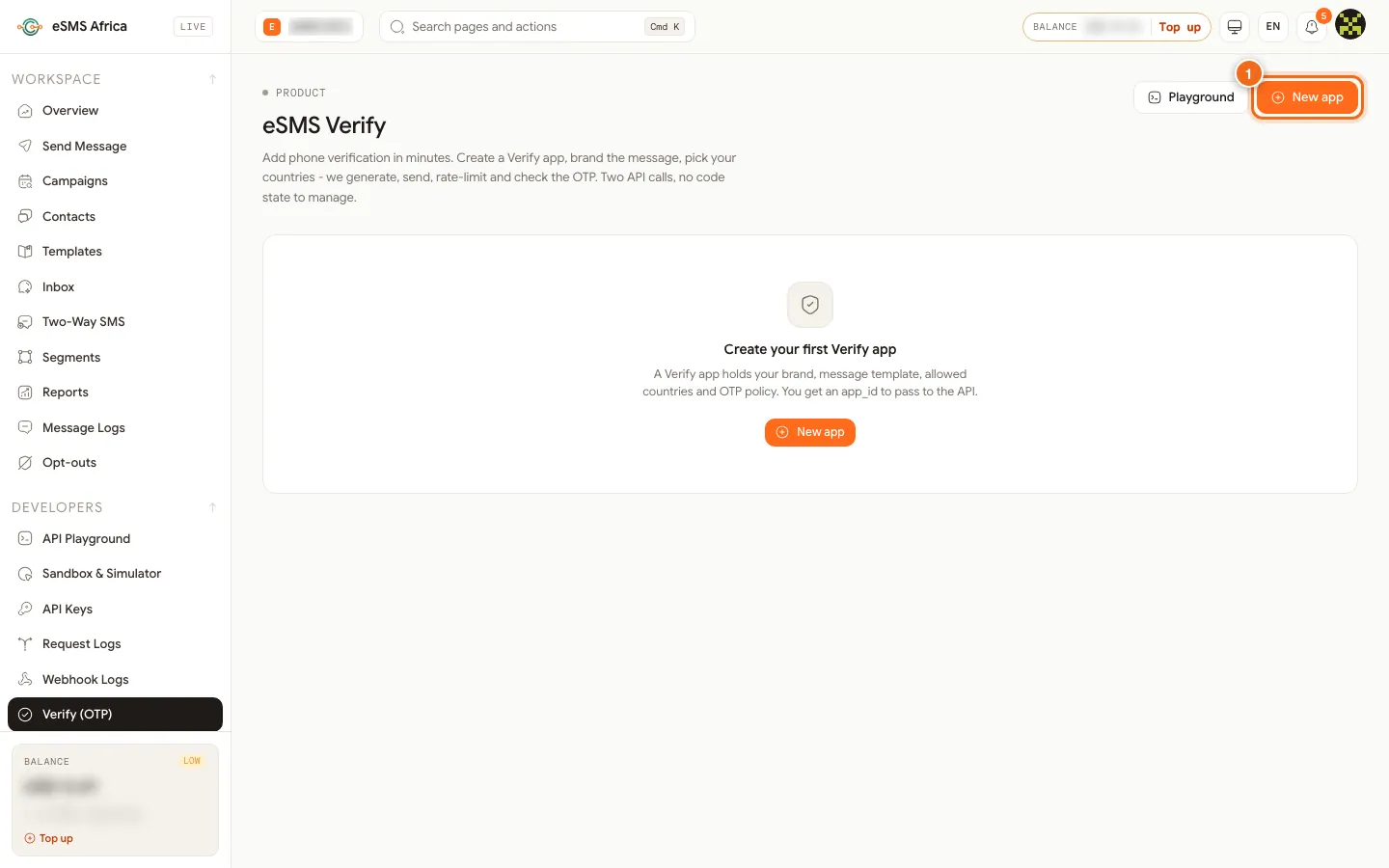
1 New app. The template must contain
{code}; you can also use{app}(the app name) and{min}(minutes until expiry). A Verify app is optional: you can passcode_length,expiry_seconds,sender_idandtemplateon each call instead.Start a verification
Send the number in international format and your app id. Add an
Idempotency-Keyheader so a retried request returns the original verification instead of texting a second code.curl -X POST https://sms.esmsafrica.io/v1/verify/start \ -H "Authorization: Bearer esms_test_your_key_here" \ -H "Content-Type: application/json" \ -H "Idempotency-Key: signup-7f3a-2026" \ -d '{"to":"+254712345678","app_id":"vera_your_app_id"}'The response (HTTP 201) has the
verification_idto keep for the check, a maskedto, and the expiry:{ "verification_id": "ver_9f8c1234ab", "app_id": "vera_your_app_id", "to": "+2547****5678", "status": "pending", "attempts_remaining": 5, "sends": 1, "expires_at": "2026-10-29T09:05:00+00:00" }Check the code
curl -X POST https://sms.esmsafrica.io/v1/verify/check \
  -H "Authorization: Bearer esms_test_your_key_here" \
  -H "Content-Type: application/json" \
  -d '{"verification_id":"ver_9f8c1234ab","code":"482193"}'
The
statustells you what to do next:status Meaning approvedThe code matched. The number is verified. pendingWrong code; attempts_remainingsays how many tries are left.failedToo many wrong attempts ( reason: too_many_attempts). Start a new verification.expiredThe code ran out of time before a correct entry. canceledYou cancelled the verification. You can check by
toinstead ofverification_id; that checks the most recent pending verification for the number.Resend or cancel
POST /v1/verify/{verification_id}/resendsends a fresh code and resets the expiry and attempt count, up to 4 sends in total (the first plus 3 resends).POST /v1/verify/{verification_id}/cancelvoids a verification the user abandoned.GET /v1/verify/{verification_id}reads the state without using up an attempt.Use an SDK
All four SDKs wrap the same calls. In Node.js:
import { Esms } from "esms-sms";
const esms = new Esms({ apiKey: process.env.ESMS_API_KEY });

// 1. Send the code
const v = await esms.verify.start({ to: "+254712345678", appId: process.env.VERIFY_APP_ID });

// 2. Later, check what the user typed
const result = await esms.verify.check({ verificationId: v.verification_id, code: userInput });
if (result.status === "approved") {
  // the number is verified
}
Python uses
esms.verify.start(to, app_id=...)andesms.verify.check(code, verification_id=...); Go usesclient.Verify.Startandclient.Verify.Check.Test without sending
With a test key no SMS is sent and nothing is charged. The start response includes
sandbox_code, and000000always passes the check. The Try it card on your Verify app's page also lets you run a start and check from the dashboard.
Common errors and how to fix them
| What you see | What it means | How to fix it |
|---|---|---|
403 country_not_allowed | The number's country is not in the app's Allowed countries. | Add the country to the app, or leave the list empty to allow all countries. |
403 app_disabled | The Verify app is switched off. | Enable the app on its page in the dashboard. |
404 app_not_found | The app_id does not exist on this account. | Copy the id again from the Verify page; it starts with vera_. |
400 template_missing_code | Your template has no {code} placeholder. | Add {code} to the template (480 characters at most). |
403 sender_not_approved | The sender ID is not approved for that country. | Remove it to use the default sender, or get it approved on the Sender IDs page. |
403 country_not_enabled | Live sending to that country is off for your account. | Enable the country on the Countries page. |
429 too_many_requests | More than 5 starts for this number in the last hour. | Ask the user to wait, and reuse the existing verification with resend. |
429 resend_limit or 409 not_pending | Four sends already, or the verification is no longer pending. | Start a new verification. |
502 otp_send_failed | The code could not be sent. You were not charged. | Retry after a moment; check the number if it keeps failing. |
Frequently asked questions
Do I have to store the OTP code?
No. eSMS stores it hashed and checks it for you; you only keep the verification_id.
How long is a code valid?
Five minutes by default. Set 60 to 900 seconds with the app's Expiry or expiry_seconds.
How many wrong attempts are allowed?
Five by default, configurable from 1 to 10 per app. A resend gives the user a fresh set of attempts.
Can I send the code by voice or WhatsApp?
No. The only channel today is SMS.
What happens if the user opted out?
The start is refused with 403 recipient_opted_out and nothing is sent.
Related guides
Ready? Create a free eSMS account, open Verify (OTP) and create your first app, then test it with a test API key and the code 000000.