SMS marketing for retail works when offers go only to customers who opted in, arrive at sensible hours, carry a clear way to stop, and are measured. The eSMS dashboard covers each part: segments to pick the right customers, Promotional campaigns that respect quiet hours and add your opt-out line, starter templates for sales and loyalty, and link click tracking in the campaign report.
Last reviewed: 29 October 2026
What retailers send by SMS
- Sales and promo codes (Weekend sale starter template) - promotional.
- Loyalty points and rewards (Loyalty points balance) - promotional.
- Launches and store events (Event invite) - promotional.
- Order updates (Out for delivery, Ready for pickup) - transactional; online stores usually send these from their shop system through the API.
- Payment and invoice reminders for account customers (Payment reminder, Invoice overdue) - transactional.
How to set up SMS marketing for retail
Set your messaging defaults
In Settings > Messaging, switch on Hold promotional messages during quiet hours and set the times, and change the Opt-out line to wording that works for your sender, for example "To stop offers, call our helpline". It is added to promotional messages that do not mention STOP.
Import customers with their details
Import your list under Contacts > Import contacts into a group such as "Loyalty members". Extra columns (city, tier, points) are kept as fields you can filter on and use as merge fields.
Build a segment
Open Segments > New segment. Add filters such as a custom field "city" is "Nairobi" or a tag "vip", choose Match all rules or Match any rule and click Preview audience. Smaller, relevant audiences cost less and get fewer opt-outs.
Write the offer as a Promotional campaign
Start a New campaign, choose the segment on the Contacts & groups tab, then on the Message step pick Promotional ("Offers and invites. Adds an opt-out line and respects quiet hours"). Insert the Weekend sale or Loyalty points balance template from Templates, and tick Track link clicks if the message has a link.
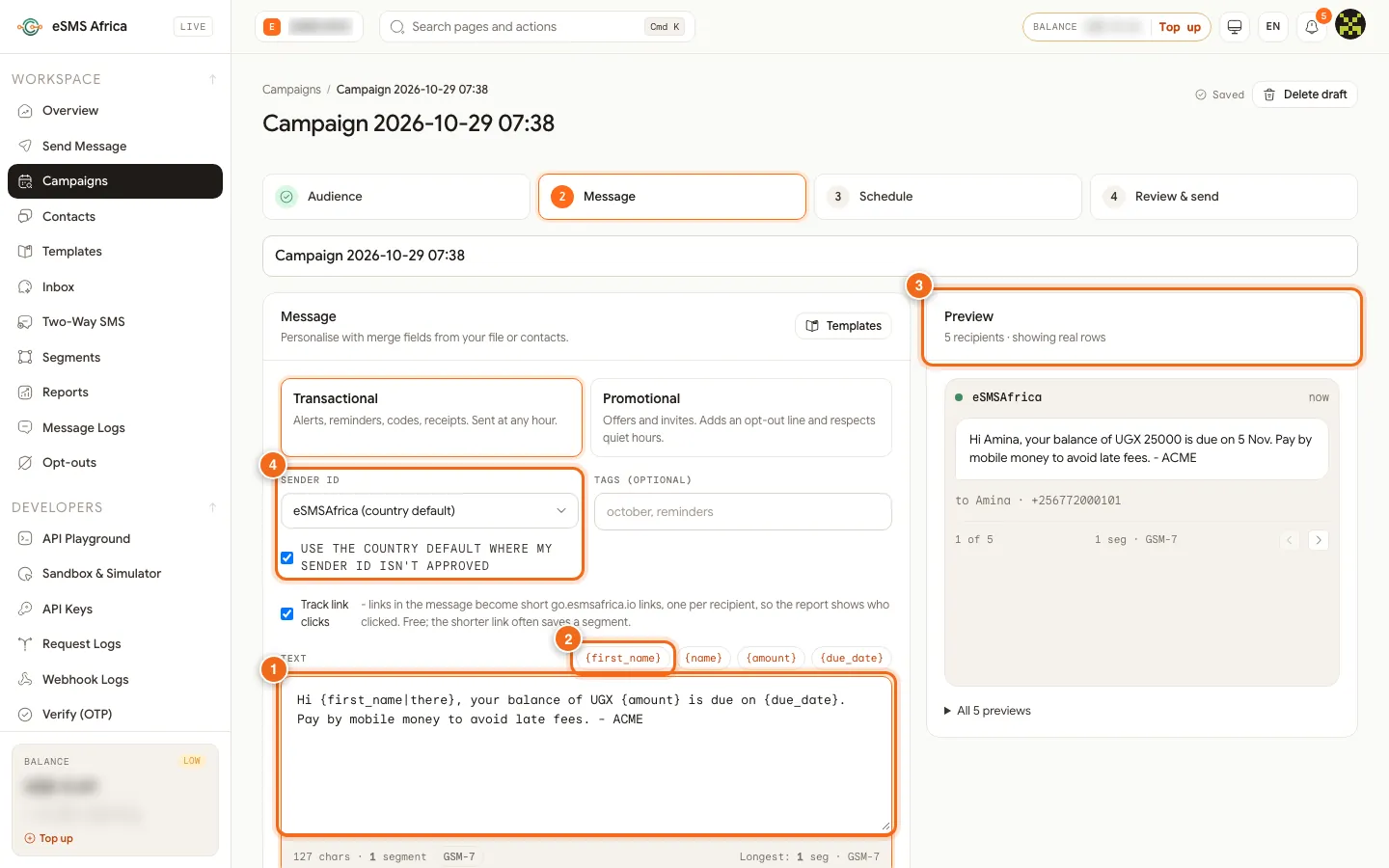
1 Text box with merge fields, 2 merge-field chips, 3 Preview with real rows, 4 Sender ID. Pace the send
On the Schedule step, pick a time customers are likely to shop (for example Friday at lunchtime for a weekend sale). In Delivery controls, a Throttle spreads the send so your website, tills and phone lines are not flooded at once.
Test, then send
On Review & send, check Estimated cost and Balance after, click Send test to me to see it on your own phone, then send or schedule.
Measure and improve
The campaign report shows Link clicks (clicks, people who clicked and the click rate), delivery by country and network, and what it cost. Compare campaigns in Reports under Spend by campaign, and keep an eye on Opt-outs after each send.
Sample messages
Examples with a made-up store. Each promotional sample already tells people how to stop.
- Weekend sale (promotional, 140 characters):
Duka Fresh: 20% off all cooking oil this weekend only. Show this SMS at the till or use code OIL20 online. To stop offers, tell any cashier. - Loyalty points (promotional, 132 characters):
Hi Peter, you have 1,250 Duka Fresh points worth KES 625. Redeem them before 30 Nov at any branch. To stop offers, tell any cashier. - Out for delivery (transactional, 105 characters):
Hi Peter, your Duka Fresh order 10482 is out for delivery today. Our rider will call you before arriving. - Ready for pickup (transactional, 111 characters):
Hi Peter, your order 10482 is ready for pickup at Duka Fresh Westlands until 2 Nov. Bring this SMS and your ID.
Consent, quiet hours and opt-outs
Consent is required for promotional SMS. Only send offers and marketing to customers who agreed to hear from you, and keep a record of when and how they agreed (a signed form, a tick box, a registration record). Service messages they expect, such as alerts and reminders about their own account, are transactional, but they still need a correct, current number.
Rules on sender IDs, content and sending hours vary by country. Before you send, open the country on the Countries page and read its compliance notes, and check our sender ID guides for Kenya, Nigeria, Uganda.
In Settings > Messaging, switch on Hold promotional messages during quiet hours and set Quiet from and Until. Promotional messages that fall inside the window wait and go out when it ends, in each recipient's local time. Transactional messages (alerts, codes, reminders) are not held unless a campaign turns quiet hours on.
The Opt-out line in the same tab is added to promotional messages that do not already mention STOP. It starts as "Reply STOP to opt out". If your sender ID cannot receive replies, change it (up to 80 characters) to something people can act on, such as "To stop offers, call our helpline", with your real contact. The promotional samples below already contain the word "stop", so the line is not added a second time. People who opt out are listed under Opt-outs and excluded from every send; you can also add a number there by hand when someone asks in person.
Common errors and how to fix them
| What you see | What it means | How to fix it |
|---|---|---|
sender_not_approved | The sender ID you chose is not approved for that country yet. | Wait for approval, or tick "Use the country default where my sender ID isn't approved" in the campaign. |
country_not_enabled | The destination country is not switched on for your account. | An Owner or Admin opens Countries and clicks Enable for that country. |
missing_merge_field | A row has no value for a merge field and the field has no fallback. Nothing is charged. | Fill the column, or add a fallback such as {first_name|there}. |
| "Paused: balance too low" | Campaigns are charged batch by batch and the balance ran out. | Top up, then click Resume. Nobody gets the message twice. |
| Message grew to 2 segments after sending as Promotional | The opt-out line was added because the message does not contain the word "stop". | Write your own opt-out wording with "stop" in it, or shorten the offer. |
| Promotional campaign sends later than planned | The send time fell inside quiet hours in the recipients' local time. | Schedule outside quiet hours. Messages held by quiet hours go out when the window ends. |
Frequently asked questions
Can I send offers to every customer on my list?
Only to customers who agreed to receive offers. Order updates for a purchase they made are transactional, but marketing needs consent.
How do I know if an offer worked?
Tick Track link clicks when you write the campaign. The report shows clicks, people who clicked, the click rate and clicks per link.
Can customers reply to an offer?
Not to a one-way sender ID. For keyword campaigns, such as "text WIN to enter", request a Two-Way SMS keyword on our shared short code.
Why is my promotion held until the morning?
Quiet hours hold promotional messages during the hours you set, in each recipient's local time, and release them when the window ends.
Related guides
Ready? Create a free eSMS account, build your first segment and send a test offer to yourself.