SMS alerts for banks and SACCOs work best when every message comes from your own approved sender ID, a second person signs off bulk sends, and one-time codes go through a dedicated OTP service. In the eSMS dashboard that means: request a sender ID, turn on campaign approval, add the bank alert templates from the Starter pack, schedule loan reminders from your monthly file and send codes with eSMS Verify.
Last reviewed: 29 October 2026
What banks and SACCOs send by SMS
| Message | Type | Starter template | Best sent from |
|---|---|---|---|
| Debit and credit alerts | Transactional | Debit alert, Credit alert | Your core banking system, through the eSMS API |
| Card purchase alerts | Transactional | Card transaction alert | Your card system, through the API |
| Login and payment codes | Transactional | Login code, Transaction authorisation code | eSMS Verify, which creates, expires and checks the code |
| Loan repayment reminders | Transactional | Loan repayment due | A scheduled campaign from this cycle's file |
| AGM and member notices | Transactional | Event invite, Event reminder (registered guests) | A campaign to a contact group |
| Product offers | Promotional | Loyalty points balance, or your own | A campaign to members who agreed to offers |
How to set up SMS alerts for banks and SACCOs
Register your sender ID
Open Sender IDs > Request sender ID. Enter your name exactly as members should see it (up to 11 letters and digits, for example UMOJASACCO), pick the countries and describe the use case, such as "account alerts and loan reminders for members". The fee is charged only on approval. Members are taught to distrust unknown senders, so wait for your own sender ID before you move alerts over.
Give your team the right roles
Under Settings > Team, invite loans and member-services staff as Sender, a branch manager or compliance officer as Approver, and IT as Admin. Then in Settings > Messaging switch on Require approval for campaigns. Leave both thresholds empty to make every campaign need sign-off, or set a recipient count or a cost so only large sends wait. Nobody can approve their own campaign.
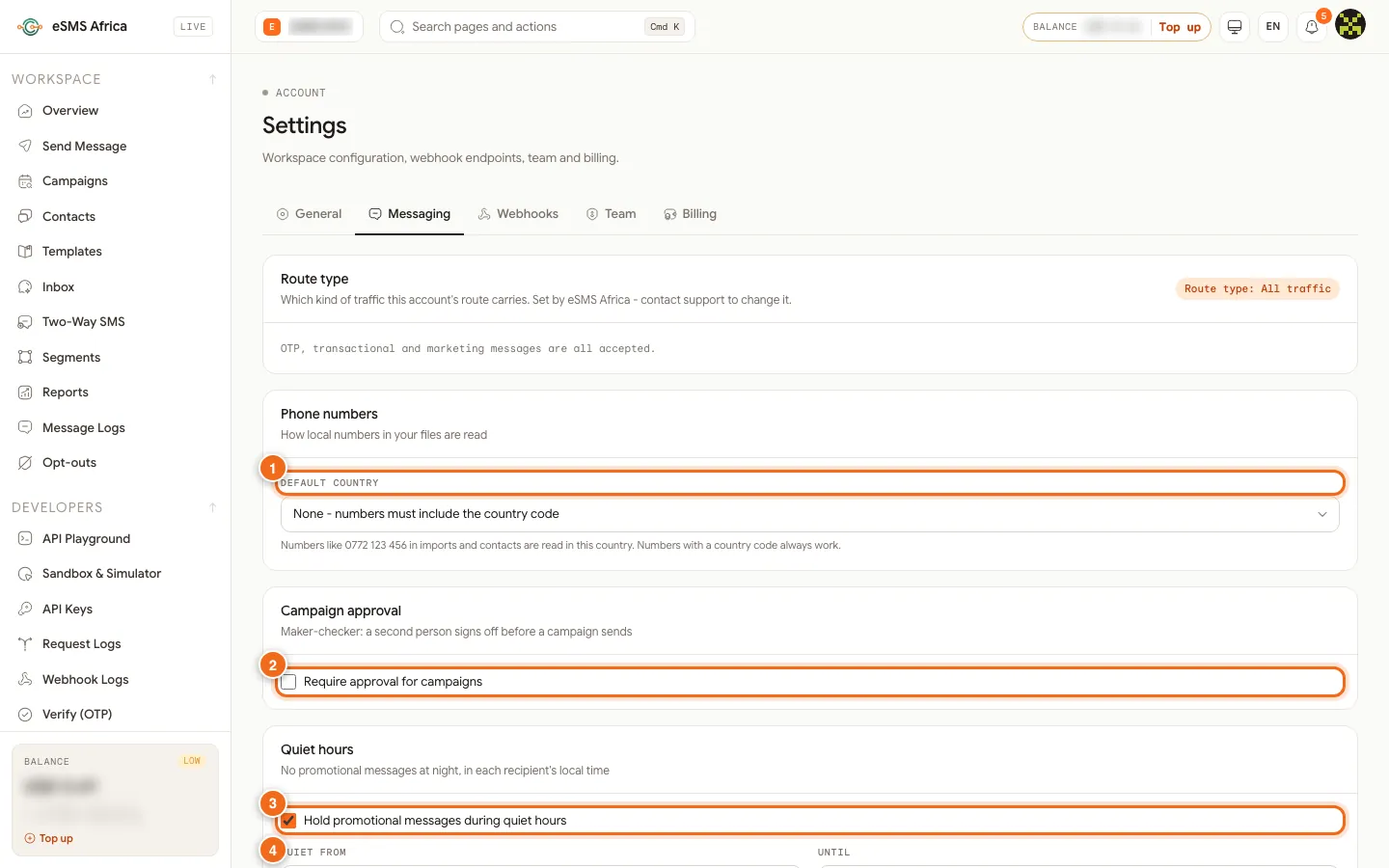
1 Default country, 2 Require approval for campaigns, 3 Hold promotional messages during quiet hours, 4 Opt-out line. Add the bank templates
Open Templates, find the Starter pack and click Add to library on Debit alert, Credit alert, Card transaction alert and Loan repayment due. Edit them to your name and helpline. Keep account numbers masked as the templates do (
****{account_last4}), and never put a full account number or PIN in an SMS.Import your member lists
In Contacts, click Import contacts, set Default country for local numbers if your file has numbers like 0772..., and save each list to a group such as "Loan clients - Main branch". Every extra column (amount, due date, branch) becomes a merge field.
Schedule loan reminders each cycle
Each repayment cycle, start a New campaign, upload that cycle's file (balances change, so use fresh figures), choose Transactional, insert the Loan repayment due template and pick Schedule for a date a few days before the due date. Use Repeat only for wording that does not change, such as a monthly "statements are ready" notice to a group; each run re-reads the audience, including new contacts and opt-outs.
Send codes with eSMS Verify
For login and payment codes, use eSMS Verify instead of campaigns or templates. It creates the code, sends it, limits attempts and checks it, so codes never sit in a spreadsheet. Your developers can follow Send and check OTPs with eSMS Verify.
Watch delivery and keep records
Turn on the Low balance alert so alerts never stop for lack of credit, and Delivery rate drop to hear early about network problems. Export campaign reports and the Audit log monthly for your records; the audit log shows who submitted and who approved each campaign.
Sample messages
Examples with made-up names and figures. Keep transactional alerts to one segment (160 GSM characters) where you can.
- Debit alert (transactional, 130 characters):
Umoja SACCO: KES 4,500 withdrawn from A/C ****2231 on 28 Oct. Bal: KES 18,240. Not you? Call the helpline on your member card now. - Loan reminder (transactional, 123 characters):
Dear Grace, your Umoja SACCO loan repayment of KES 6,200 is due on 05 Nov. Pay by mobile money or at any branch. Thank you. - AGM notice (transactional, 122 characters):
Umoja SACCO AGM: Sat 15 Nov, 9am, Town Hall. Bring your member card. The agenda and dividend proposal are at every branch. - Offer to consenting members (promotional, 134 characters):
Umoja SACCO: school fees loans now approved within 48 hours. Ask at any branch. To stop offers, tell your branch or call our helpline. - Login code (sent by eSMS Verify) (transactional, 98 characters):
Your Umoja SACCO code is 482913. It expires in 5 minutes. Never share it, not even with our staff.
Consent, quiet hours and opt-outs
Consent is required for promotional SMS. Only send offers and marketing to members and customers who agreed to hear from you, and keep a record of when and how they agreed (a signed form, a tick box, a registration record). Service messages they expect, such as alerts and reminders about their own account, are transactional, but they still need a correct, current number.
Rules on sender IDs, content and sending hours vary by country. Before you send, open the country on the Countries page and read its compliance notes, and check our sender ID guides for Kenya, Uganda, Rwanda.
In Settings > Messaging, switch on Hold promotional messages during quiet hours and set Quiet from and Until. Promotional messages that fall inside the window wait and go out when it ends, in each recipient's local time. Transactional messages (alerts, codes, reminders) are not held unless a campaign turns quiet hours on.
The Opt-out line in the same tab is added to promotional messages that do not already mention STOP. It starts as "Reply STOP to opt out". If your sender ID cannot receive replies, change it (up to 80 characters) to something people can act on, such as "To stop offers, call our helpline", with your real contact. The promotional samples below already contain the word "stop", so the line is not added a second time. People who opt out are listed under Opt-outs and excluded from every send; you can also add a number there by hand when someone asks in person.
Common errors and how to fix them
| What you see | What it means | How to fix it |
|---|---|---|
sender_not_approved | The sender ID you chose is not approved for that country yet. | Wait for approval, or tick "Use the country default where my sender ID isn't approved" in the campaign. |
country_not_enabled | The destination country is not switched on for your account. | An Owner or Admin opens Countries and clicks Enable for that country. |
missing_merge_field | A row has no value for a merge field and the field has no fallback. Nothing is charged. | Fill the column, or add a fallback such as {first_name|there}. |
| "Paused: balance too low" | Campaigns are charged batch by batch and the balance ran out. | Top up, then click Resume. Nobody gets the message twice. |
| Campaign stays in Needs approval | Approval is on and nobody else has approved it. | An Approver, Admin or the Owner who did not submit it opens the campaign and clicks Approve. |
| Alerts arrive as eSMSAfrica | Your own sender ID is not approved yet, so the country default was used. | Check My sender IDs on the Sender IDs page; switch alerts over once it is approved. |
Frequently asked questions
Can transaction alerts be sent automatically from our core banking system?
Yes. Your developers connect the system to the eSMS API so each transaction triggers an alert. See the send your first SMS guide for developers.
Should we send OTPs as a campaign?
No. Use eSMS Verify for one-time codes. It handles expiry, attempt limits and checking, and keeps codes out of files.
Will quiet hours delay our transaction alerts?
No. Quiet hours hold promotional messages only. Transactional messages go out at any hour unless a campaign turns quiet hours on.
Do we need a sender ID on each network?
In some countries, such as Kenya and Uganda, sender ID fees are charged per network. The Sender IDs page shows the fee for each country before you submit.
Can a loans officer send a campaign alone?
Only if approval is off or the campaign is below your thresholds. With approval on, someone else must approve it.
Related guides
Ready? Create a free eSMS account, request your SACCO or bank sender ID and set up approvals before your first campaign.