Bulk SMS for schools means reaching every parent or student quickly with fee balances, term dates, absences and urgent closures. In the eSMS dashboard you set up a sender ID in the school's name, import parents into groups by class, personalise fee reminders with each student's balance, and let the bursar or head teacher approve large sends before they go.
Last reviewed: 29 October 2026
What schools send by SMS
- Fee balances and payment reminders: the School fees balance starter template uses
{student_name},{balance}and{due_date}. - Term dates, reporting days and results: plain notices to a whole group.
- Absence and welfare notices: one-to-one messages from Send Message.
- Closures and emergencies: transactional, sent at any hour.
- Events, open days and admissions: the Event invite and Event reminder (registered guests) templates.
How to set up bulk SMS for schools
Request the school's sender ID
Open Sender IDs > Request sender ID and enter the name parents will recognise, up to 11 characters (for example HILLSIDE). The fee is charged only on approval. Until then, messages go out from your country's default sender, so sign each message with the school name.
Import parents into class groups
Open Contacts > Import contacts. Upload a file, paste numbers or link a Google Sheet, set Default country for local numbers if your list has numbers like 0772..., and save each class or stream to its own group, for example "S2 East parents". Invalid and duplicate numbers are skipped.
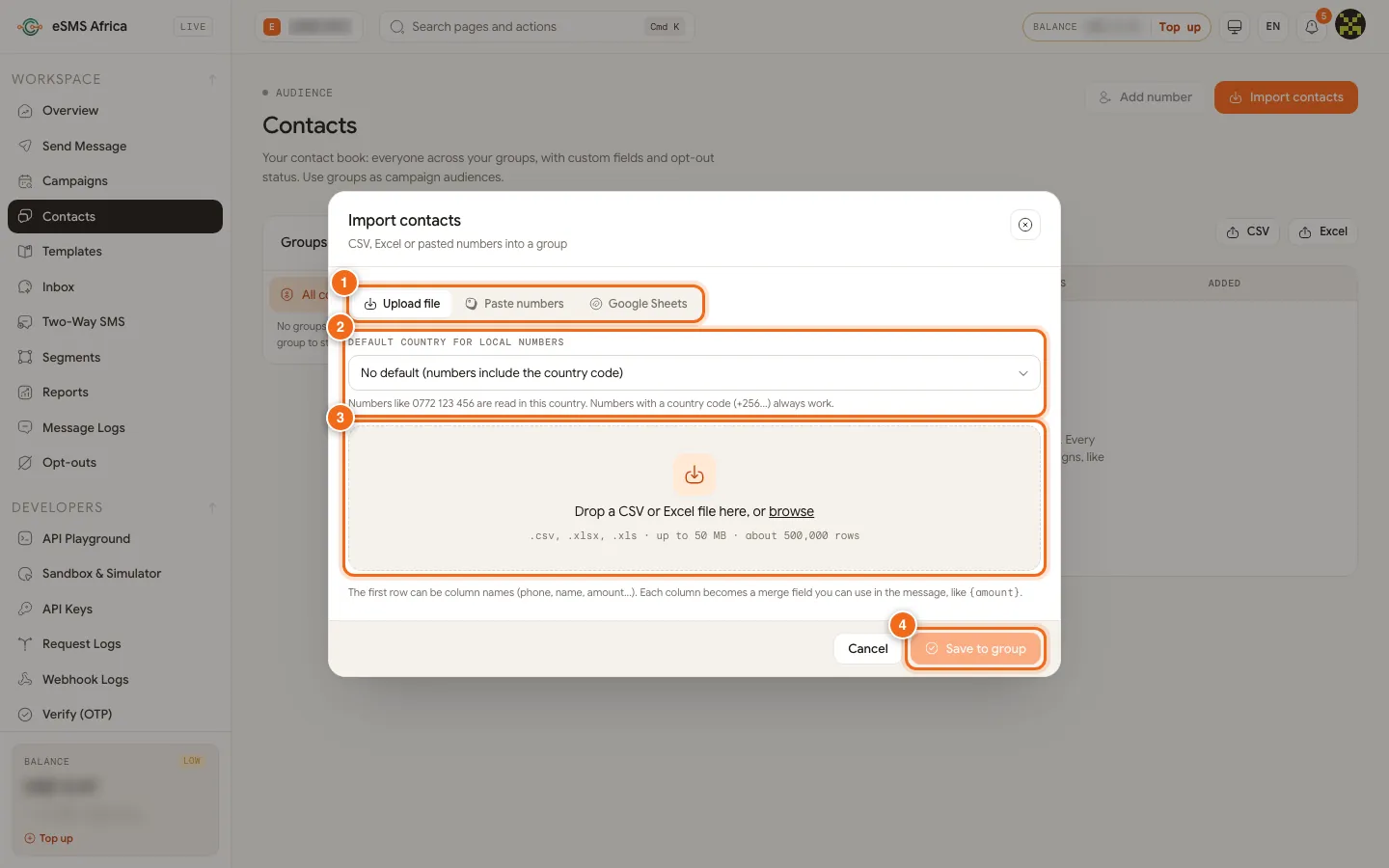
1 Upload file / Paste numbers / Google Sheets, 2 Default country for local numbers, 3 Drop a CSV or Excel file, 4 Save to group. Set roles and approval
Invite class teachers or the school secretary as Sender and the bursar or head teacher as Approver under Settings > Team. In Settings > Messaging, switch on Require approval for campaigns with a recipient threshold (for example 200), so whole-school messages are checked while small class notices go straight out.
Personalise fee reminders
Start a New campaign and upload the bursar's balance list. Each column becomes a merge field. Insert the School fees balance template, check the Preview with real rows, and add a fallback where a value may be blank, such as
{student_name|your child}. Choose Transactional.Schedule term reminders
On the Schedule step, pick a date and time a week before fees are due. For a weekly notice with the same wording, such as "visiting day this Sunday", use Repeat with Every week, choose the day and time, and set when it Ends.
Send urgent notices fast
For a closure, use Send Message > Bulk & personalised or a campaign to the whole school, marked Transactional so it is not held by quiet hours.
Check who received it
Open the campaign report, select the Failed tab in Recipients and export it. Class teachers can call those parents and update numbers before the next send.
Sample messages
Examples with a made-up school. Most local languages written in the Latin alphabet fit the standard 160-character segment; characters outside it switch the message to Unicode (70 characters per segment).
- Fee balance (transactional, 112 characters):
Dear parent, Brian's fee balance is UGX 350,000. Kindly clear it by 10 Nov to avoid disruption. Hillside Academy - Term opening (transactional, 103 characters):
Hillside Academy: Term 3 opens Mon 1 Sep. Boarders report by 4pm with the items on the list. Thank you. - Absence (transactional, 103 characters):
Hillside Academy: Brian was absent today, 28 Oct. If this is unexpected, please call the school office. - Closure (transactional, 114 characters):
Hillside Academy: school is closed tomorrow, 29 Oct, because of heavy rain. Classes resume on Thursday. Stay safe. - Open day (promotional, 123 characters):
Hillside Academy Open Day: Sat 8 Nov, 10am. Meet teachers and tour the labs. To stop these updates, tell the school office.
Consent, quiet hours and opt-outs
Consent is required for promotional SMS. Only send offers and marketing to parents and students who agreed to hear from you, and keep a record of when and how they agreed (a signed form, a tick box, a registration record). Service messages they expect, such as alerts and reminders about their own account, are transactional, but they still need a correct, current number.
Rules on sender IDs, content and sending hours vary by country. Before you send, open the country on the Countries page and read its compliance notes, and check our sender ID guides for Uganda, Kenya, Tanzania.
In Settings > Messaging, switch on Hold promotional messages during quiet hours and set Quiet from and Until. Promotional messages that fall inside the window wait and go out when it ends, in each recipient's local time. Transactional messages (alerts, codes, reminders) are not held unless a campaign turns quiet hours on.
The Opt-out line in the same tab is added to promotional messages that do not already mention STOP. It starts as "Reply STOP to opt out". If your sender ID cannot receive replies, change it (up to 80 characters) to something people can act on, such as "To stop offers, call our helpline", with your real contact. The promotional samples below already contain the word "stop", so the line is not added a second time. People who opt out are listed under Opt-outs and excluded from every send; you can also add a number there by hand when someone asks in person.
Common errors and how to fix them
| What you see | What it means | How to fix it |
|---|---|---|
sender_not_approved | The sender ID you chose is not approved for that country yet. | Wait for approval, or tick "Use the country default where my sender ID isn't approved" in the campaign. |
country_not_enabled | The destination country is not switched on for your account. | An Owner or Admin opens Countries and clicks Enable for that country. |
missing_merge_field | A row has no value for a merge field and the field has no fallback. Nothing is charged. | Fill the column, or add a fallback such as {first_name|there}. |
| "Paused: balance too low" | Campaigns are charged batch by batch and the balance ran out. | Top up, then click Resume. Nobody gets the message twice. |
| Many numbers skipped as invalid on import | Local numbers were read without a country. | Set Default country for local numbers in the import, or Default country in Settings > Messaging. |
| Message counted as 2 segments | It is over 160 characters, or a character switched it to Unicode. | Shorten it. The composer names the character that caused Unicode. |
Frequently asked questions
Can each parent get their own child's balance?
Yes. Upload a file with a balance column and use the {balance} merge field; every parent sees only their own row.
Can teachers send without the head teacher seeing it?
With approval on, campaigns above your threshold wait for an Approver. Everything is also recorded in the audit log.
Can parents reply to a school SMS?
Not to a one-way sender ID. For replies, request a Two-Way SMS keyword on our shared short code and answer from the Inbox.
Is there a limit on how many parents we can import?
One import takes files up to 50 MB, about 500,000 rows.
Related guides
Ready? Create a free eSMS account, import one class and send your first fee reminder today.