To send SMS in Python, run pip install esms-sms, create an API key in the eSMS dashboard and call esms.messages.send(to=..., text=...). Start with a test key so you can send SMS from Python and see real responses without anything reaching a phone network or touching your balance.
Last reviewed: 29 October 2026
How to send SMS in Python step by step
Create an API key
Sign in at sms.esmsafrica.io and open API Keys under DEVELOPERS in the left menu. Type a Key name, pick the Environment and tick the Permissions the key needs: Send SMS and Read messages and reports cover sending and status checks. Choose Test (sandbox) while you build. Click Generate key and copy it straight away: the full key is shown once, right after you create it. Test keys start with
esms_test_, live keys withesms_live_.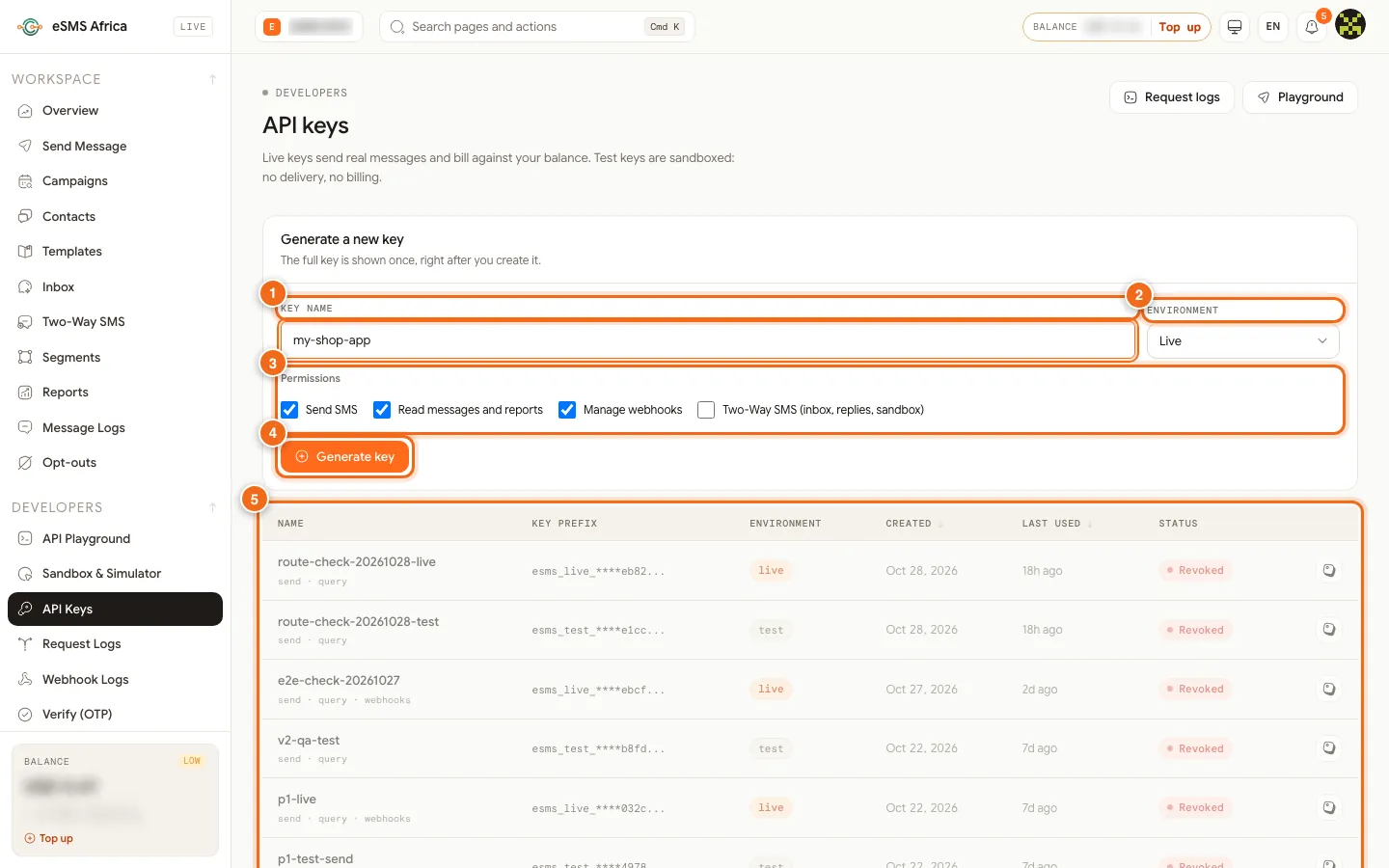
1 Key name, 2 Environment (Live or Test), 3 Permissions checkboxes, 4 Generate key button, 5 API keys table. Install the package
pip install esms-smsThe current release on PyPI is 1.2.0. Note the names: you install
esms-smsbut importesms.Keep the key out of your code
Store the key in an environment variable or your secrets manager, and never commit it:
export ESMS_API_KEY=esms_test_your_key_hereSend a message
Arguments to
send()are keyword-only. The number must include the country code.# send.py import os from esms import Esms esms = Esms(api_key=os.environ["ESMS_API_KEY"]) res = esms.messages.send( to="+254712340001", # international (E.164) format text="Hello from eSMS Africa", # sender_id="YOURBRAND", # optional: an approved sender ID, else the country default ) print(res.id, res.status, res.segments)Run
python send.py. With a test key you get an id starting withtest_and a status ofqueued; the simulated message then moves to delivered unless you use one of the sandbox magic numbers. With a live key the status is normallysubmitted. If you omitsender_id, the country's default sender is used.Read the delivery status
msg = esms.messages.get(res.id)
print(msg.status)                   # queued | submitted | sent | delivered | failed ...
for event in msg.timeline:
    print(event.at, event.event, event.detail)
For production, let delivery reports come to you by webhook rather than polling: see Webhooks and delivery reports.
Catch errors by code
Every failure raises an
EsmsError(or a subclass) carryingstatus,code,messageandrequest_id.from esms import Esms, EsmsError, InsufficientBalanceError, RateLimitError try: esms.messages.send(to="+254712340001", text="Hi") except InsufficientBalanceError as e: print(f"Top up: have {e.balance}, need {e.cost} {e.currency}") except RateLimitError: print("Slow down and retry later") except EsmsError as e: # e.code is the stable API code, e.g. country_not_enabled print(e.status, e.code, e.message, e.request_id)Go live
Create a key with Environment Live, enable each destination country, top up, and replace the test key. The code does not change.
Common errors and how to fix them
| What you see | What it means | How to fix it |
|---|---|---|
ModuleNotFoundError: No module named 'esms' | The package is not installed in the interpreter you are running. | Run pip install esms-sms inside the same virtual environment, then import esms. |
ValueError: An API key is required | api_key was empty. | Check the environment variable is set for the process (web server, worker or cron job). |
AuthenticationError (401) | The key is wrong or revoked. | Copy a fresh key from the API Keys page. |
403 country_not_enabled | Live sending to that country is off for your account. Nothing was charged. | Enable it on the Countries page. Test keys work without this. |
403 sender_not_approved | That sender ID is not approved for the destination country. | Omit sender_id or request the sender ID on the Sender IDs page. |
400 missing_country_code | The number is in local format. | Use the international format, such as +256772123456. |
InsufficientBalanceError (402) | Not enough balance for the message. | Top up, then retry. |
Frequently asked questions
Is the Python SDK async?
No, it is synchronous. In asyncio code, run calls in a worker thread, for example with asyncio.to_thread(), or call it from a background task queue.
Does it work with Django and Flask?
Yes. Create one Esms client at start-up, reuse it, and send from a view or a background job.
How do I send the same message to many people?
Use esms.messages.send_bulk(), or esms.messages.send_batch() for personalised text per recipient.
Can I verify webhook signatures with the SDK?
Yes. Esms.verify_webhook(raw_body, signature, secret) checks the X-Webhook-Signature header in constant time.
Related guides
Ready? Create a free eSMS account, then create a test API key and send your first simulated message in minutes. Nothing is charged until you switch to a live key.