
An SMS delivery report webhook is a URL on your server that eSMS Africa calls with a signed JSON event when a message reaches its final status, so you do not have to poll. Add your URLs under Settings > Webhooks, check the X-Webhook-Signature header on every request, and answer with a 2xx status within 15 seconds.
Last reviewed: 29 October 2026
How to set up an SMS delivery report webhook
Build an endpoint that reads the raw body
The signature is calculated over the exact bytes we send, so read the raw request body before any JSON parsing. An Express example:
import express from "express";
import crypto from "node:crypto";

const app = express();
const SECRET = process.env.ESMS_WEBHOOK_SECRET;

function validSignature(rawBody, header) {
  const expected = "sha256=" +
    crypto.createHmac("sha256", SECRET).update(rawBody).digest("hex");
  const a = Buffer.from(header || "");
  const b = Buffer.from(expected);
  return a.length === b.length && crypto.timingSafeEqual(a, b);
}

// express.raw keeps the exact bytes we were sent
app.post("/hooks/esms/dlr", express.raw({ type: "application/json" }), (req, res) => {
  if (!validSignature(req.body, req.get("X-Webhook-Signature"))) {
    return res.sendStatus(401);
  }
  const event = JSON.parse(req.body.toString("utf8"));
  // event.event is message.delivered, message.failed, ...
  // save event.message_id + event.status, then answer quickly
  res.sendStatus(200);
});

app.listen(3000);
The same check in Python with Flask:
import hashlib, hmac, os
from flask import Flask, request, abort

app = Flask(__name__)
SECRET = os.environ["ESMS_WEBHOOK_SECRET"].encode()

@app.post("/hooks/esms/dlr")
def dlr():
    raw = request.get_data()  # raw bytes, before any JSON parsing
    expected = "sha256=" + hmac.new(SECRET, raw, hashlib.sha256).hexdigest()
    if not hmac.compare_digest(expected, request.headers.get("X-Webhook-Signature", "")):
        abort(401)
    event = request.get_json()
    # event["event"], event["message_id"], event["status"], event["error_code"]
    return "", 200
The SDKs include the same check:
Esms.verifyWebhook()in Node.js,Esms.verify_webhook()in Python,Client::verifyWebhook()in PHP 1.2.0 andesms.VerifyWebhook()in Go.Add your URLs in Settings
In the dashboard open Settings and the Webhooks tab. Fill in the endpoints you need and click Save endpoints. Leave a field empty to turn that event type off.
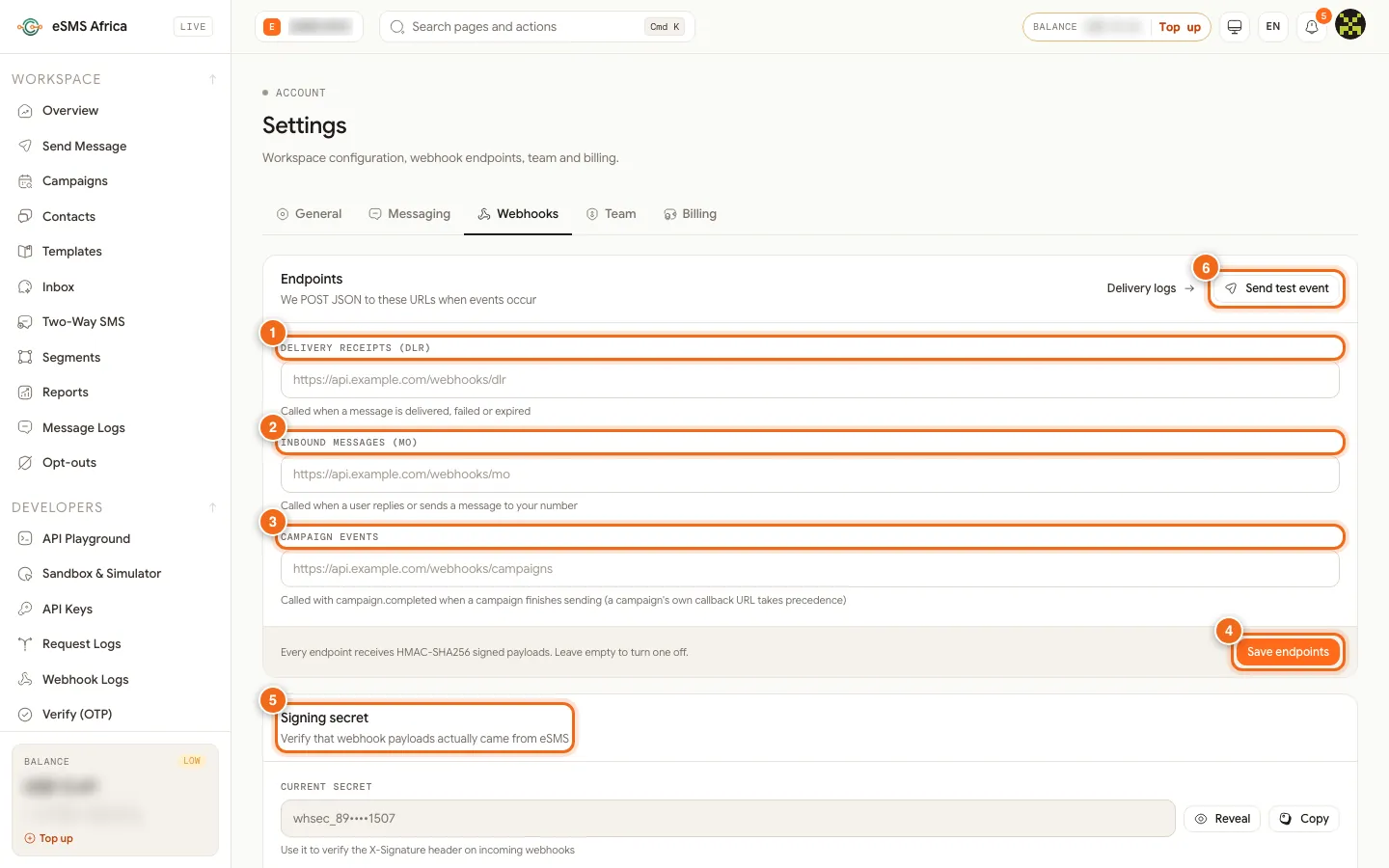
1 Delivery receipts (DLR) URL, 2 Inbound messages (MO) URL, 3 Campaign events URL, 4 Save endpoints, 5 Signing secret, 6 Send test event. Field What we send there Delivery receipts (DLR) One event per message when it reaches a final status, such as message.deliveredormessage.failed.Inbound messages (MO) message.inboundwhen someone replies or texts your number, including STOP keywords.Campaign events campaign.completedwhen a campaign or personalised batch finishes sending. A campaign's own callback URL takes precedence.Copy the signing secret
Under Signing secret, use Reveal or Copy and store the value as
ESMS_WEBHOOK_SECRETon your server. Rotate secret issues a new one and invalidates the current secret immediately, so update your server at the same time.Send a test event
Click Send test event. We post a sample signed delivery report and a sample inbound message to your saved URLs, so you can confirm the signature check passes before real traffic arrives. Every attempt is listed under Webhook Logs (the Delivery logs link on the same tab).
Process the delivery report
A delivery report looks like this (
costandcost_currencyare also included: what your wallet was charged for the message):{ "event": "message.delivered", "message_id": "4f6c1b0e-...", "status": "delivered", "phone": "+254712345678", "sender_id": "MyBrand", "segments": 1, "encoding": "GSM7", "environment": "live", "livemode": true, "batch_id": null, "campaign_id": null, "error_code": null, "error_message": null, "retry_count": 0, "delivered_at": "2026-10-29T08:30:04+00:00", "failed_at": null }Match on
message_id, the id returned when you sent. On a failure the event ismessage.failed,error_codecarries the reason andfailed_atis set.batch_idandcampaign_idare filled for bulk, batch and campaign messages.Make sure receipts are requested
On the General tab of Settings, DLR tracking should be All messages (the other options are Bulk only and Disabled). Without delivery receipts, messages stop at
sentand no final event is sent.
Common errors and how to fix them
| What you see | What it means | How to fix it |
|---|---|---|
| Signature never matches | The body was parsed and re-serialised before hashing, or the wrong header was read. | Hash the raw bytes (for example express.raw) and read X-Webhook-Signature, including the sha256= prefix. |
| Signature stopped matching today | The secret was rotated. | Copy the new secret from Settings > Webhooks and update your server. |
| No events arrive | No URL is saved, the URL is not public, or DLR tracking is Disabled. | Check the saved URLs, use a public HTTPS address, and set DLR tracking to All messages. |
| Events arrive twice | Your endpoint was slow or returned an error, so the event was retried. | Return 200 quickly and de-duplicate on message_id plus status. |
Messages stay at sent | Some networks do not return a final receipt for every message. | Treat sent as accepted by the network; only failed means it did not go through. |
| Test events appear in production data | Test-key messages also fire webhooks. | Ignore events where livemode is false in production. |
Frequently asked questions
Can I configure webhooks through the API?
Yes. GET and PUT /api/webhooks read and set dlr_url, mo_url and campaign_url; the key needs the Manage webhooks permission.
Do I get an event for every status change?
No. You get one delivery report per message, when it reaches a final status. Read the full timeline with GET /api/messages/{id}.
What does a reply look like?
Replies arrive at the inbound URL as message.inbound with from, to, text, and keyword and opt_out set for STOP and START.
Is HTTPS required?
Use HTTPS so the payload and signature travel encrypted. The endpoint must be reachable from the public internet.
How do I see failed deliveries to my endpoint?
Open Webhook Logs under DEVELOPERS. Each attempt shows its result, and you can replay it.
Related guides
Ready? Create a free eSMS account, then create a test API key and send your first simulated message in minutes. Nothing is charged until you switch to a live key.


