To send SMS from Node.js, install the official esms-sms package from npm, create an API key in the eSMS dashboard and call esms.messages.send() with the recipient in international format and your text. Use a test key first: it returns real responses but never sends or charges, so your SMS API Node.js integration is proven before you spend anything.
Last reviewed: 29 October 2026
How to send an SMS with the SMS API in Node.js
Create an API key
Sign in at sms.esmsafrica.io and open API Keys under DEVELOPERS in the left menu. Type a Key name, pick the Environment and tick the Permissions the key needs: Send SMS and Read messages and reports cover sending and status checks. Choose Test (sandbox) while you build. Click Generate key and copy it straight away: the full key is shown once, right after you create it. Test keys start with
esms_test_, live keys withesms_live_.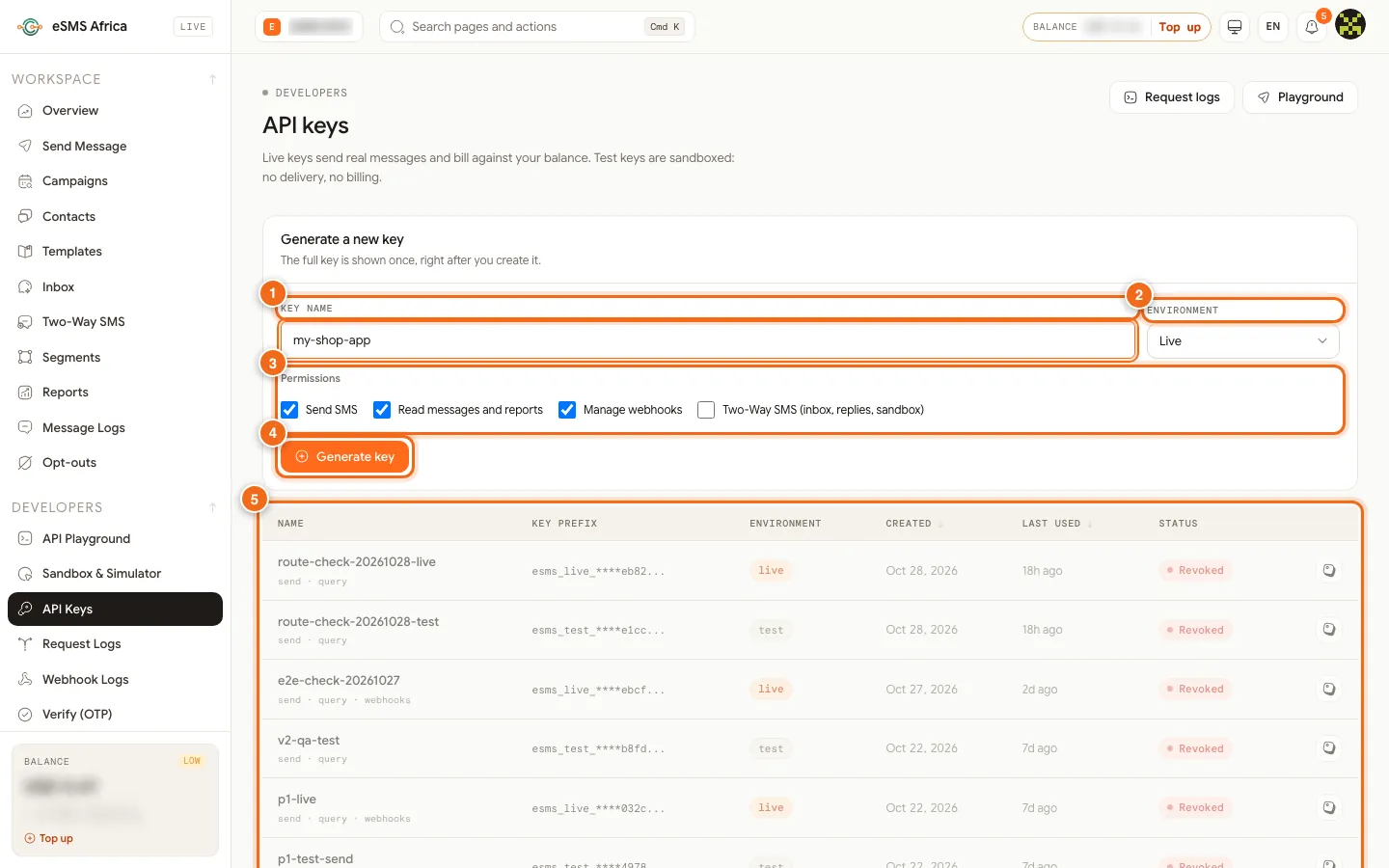
1 Key name, 2 Environment (Live or Test), 3 Permissions checkboxes, 4 Generate key button, 5 API keys table. Install the package
In your project folder run:
npm install esms-smsThe current release on npm is 1.2.0. It ships ES module and CommonJS builds plus TypeScript types, so
import { Esms } from "esms-sms"andconst { Esms } = require("esms-sms")both work.Keep the key in an environment variable
Never hard-code the key or ship it to a browser or mobile app. Set it on the server:
export ESMS_API_KEY=esms_test_your_key_hereUse a separate key for each environment (local, staging, production) so you can revoke one without touching the others.
Send a message
Create the client and send. Numbers must include the country code, for example
+254712340001.// send.mjs import { Esms } from "esms-sms"; const esms = new Esms({ apiKey: process.env.ESMS_API_KEY }); const res = await esms.messages.send({ to: "+254712340001", // international (E.164) format text: "Hello from eSMS Africa", // senderId: "YOURBRAND", // optional: an approved sender ID, else the country default }); console.log(res.id, res.status, res.segments);Run it with
node send.mjs. With a test key the response has an id starting withtest_, statusqueuedandlivemode: false, and the delivery lifecycle is simulated. With a live key the status is normallysubmittedonce the network accepts it. If you leave out the sender ID, the default sender for that country is used.Check the delivery status
Read one message, including its timeline of events:
const msg = await esms.messages.get(res.id);
console.log(msg.status);    // queued | submitted | sent | delivered | failed ...
console.log(msg.timeline);  // every event in the message's delivery history
Polling is fine for a quick test. In production, receive delivery reports by webhook instead, as shown in Webhooks and delivery reports.
Handle errors by code
Every failure is an
EsmsErrorwith the HTTPstatus, a stablecodeand arequestIdyou can quote to support. Catch the subclasses you care about:import { Esms, EsmsError, InsufficientBalanceError, RateLimitError, } from "esms-sms"; try { await esms.messages.send({ to: "+254712340001", text: "Hi" }); } catch (err) { if (err instanceof InsufficientBalanceError) { console.error(`Top up: have ${err.balance}, need ${err.cost} ${err.currency}`); } else if (err instanceof RateLimitError) { console.error("Slow down and retry later"); } else if (err instanceof EsmsError) { // err.code is the stable API code, e.g. country_not_enabled console.error(err.status, err.code, err.message, err.requestId); } else { throw err; } }Switch to live
When your tests pass, create a key with Environment Live, switch on each destination country on the Countries page, top up, and swap the key in your environment variable. No code change is needed.
Common errors and how to fix them
| What you see | What it means | How to fix it |
|---|---|---|
AuthenticationError (401) | The key is missing, mistyped or revoked. | Check ESMS_API_KEY is set in the process that runs the code, and that the key is not revoked on the API Keys page. |
403 insufficient_scope | The key does not have the permission for this call. | Generate a new key with Send SMS ticked (and Read messages and reports for status calls). |
403 country_not_enabled | Live sending to that country is not switched on for your account. Nothing was charged. | Open Countries in the dashboard and click Enable. Test keys do not need this. |
403 sender_not_approved | The sender ID is not approved for the destination country. | Leave senderId out to use the default, or request the sender ID on the Sender IDs page. |
400 missing_country_code | The number was sent in local format, such as 0712... | Send it in international format, for example +254712340001. See the E.164 guide. |
InsufficientBalanceError (402) | Your balance does not cover the message. | Top up at auth.esmsafrica.io/topup, then send again. |
ReferenceError: fetch is not defined | The code is running on a Node.js version older than 18. | Upgrade to Node.js 18 or later. |
Frequently asked questions
Does the SDK work with TypeScript?
Yes. The package ships its own type definitions, so parameters and results are typed without installing anything extra.
Can I use the SDK in a browser or React Native app?
No. Keep the API key on your server. Call your own back end from the app, and let the back end call eSMS Africa.
Is there a test mode?
Yes. A key created with Environment Test (sandbox) uses the same endpoints but never sends or charges, and the last four digits of the number pick the simulated result.
Can I send to many numbers at once?
Yes. Use messages.sendBulk() for one text to many numbers or messages.sendBatch() for personalised messages. See the bulk and batch guide.
Where is the full method list?
The Node.js page on docs.esmsafrica.io lists every resource, including Verify, opt-outs, campaigns and contacts.
Related guides
Ready? Create a free eSMS account, then create a test API key and send your first simulated message in minutes. Nothing is charged until you switch to a live key.