
The eSMS SMS API sandbox lets you build and test a whole integration without sending a real SMS or spending balance: create a key with Environment Test (sandbox) and call the same endpoints you will use in production. The last four digits of the destination number choose the simulated result, so you can test delivered, failed and insufficient-balance paths on purpose.
Last reviewed: 29 October 2026
How to test with the SMS API sandbox
Create an API key
Sign in at sms.esmsafrica.io and open API Keys under DEVELOPERS in the left menu. Type a Key name, pick the Environment and tick the Permissions the key needs: Send SMS and Read messages and reports cover sending and status checks. Set Environment to Test (sandbox). Tick Manage webhooks as well if your tests configure webhook URLs through the API. Click Generate key and copy it straight away: the full key is shown once, right after you create it. Test keys start with
esms_test_, live keys withesms_live_.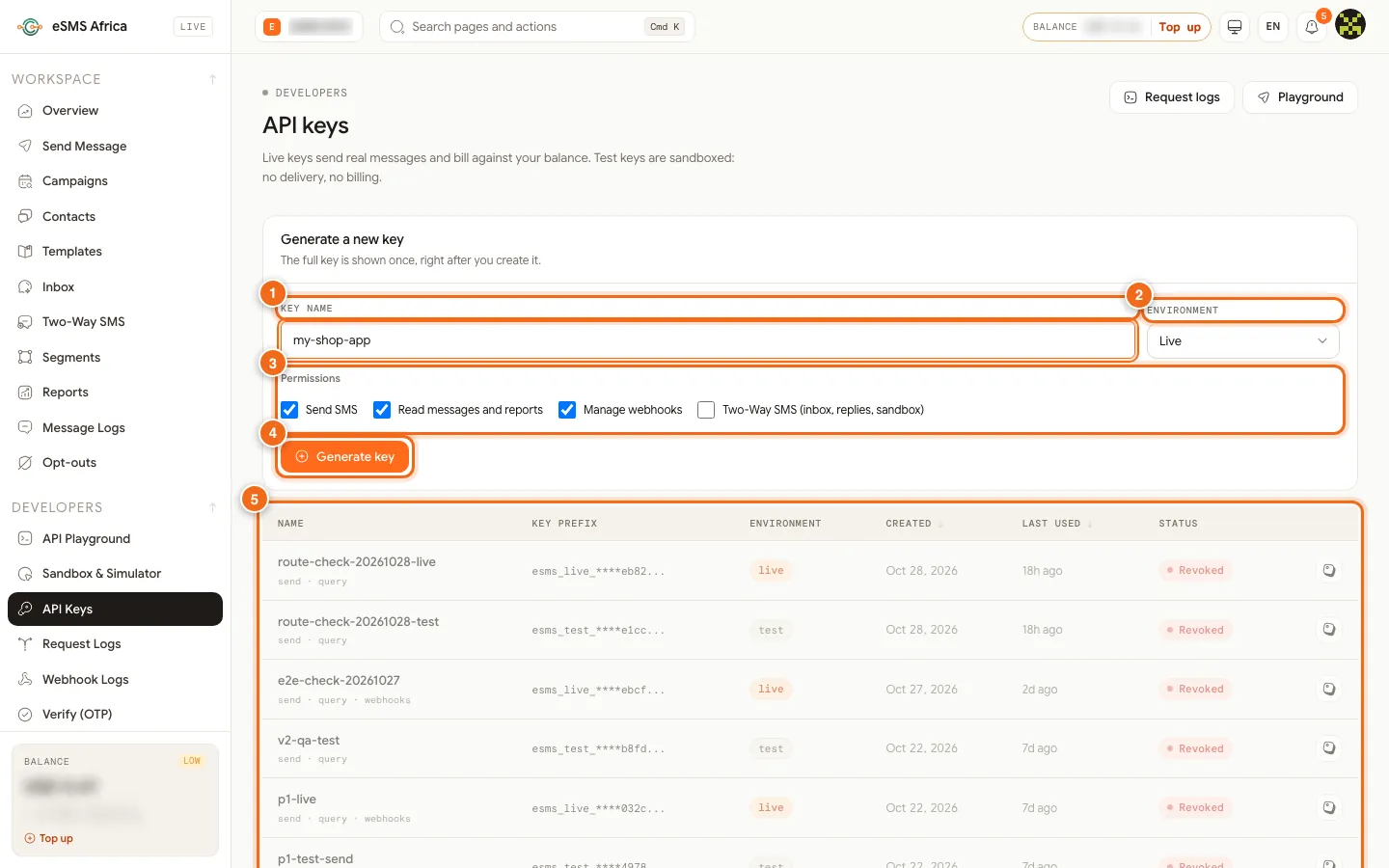
1 Key name, 2 Environment (Live or Test), 3 Permissions checkboxes, 4 Generate key button, 5 API keys table. Send a test message
Use the key exactly as you would a live one. Only the key changes between test and production.
curl https://sms.esmsafrica.io/api/messages/send \
  -H "Authorization: Bearer esms_test_your_key_here" \
  -H "Content-Type: application/json" \
  -d '{"to":"+254712340001","text":"Hello from the sandbox"}'
The response looks like a live one, with real segment and encoding counts, plus fields that tell you it was simulated:
{
  "id": "test_43105d4651d54e3e9d762b200f64508e",
  "status": "queued",
  "environment": "test",
  "livemode": false,
  "segments": 1,
  "encoding": "GSM7",
  "note": "Sandbox message - simulated, not sent to a real network and not billed.",
  "live": {
    "country": "KE",
    "availability": "live",
    "country_enabled": false,
    "note": "Enable this country for live sends at https://sms.esmsafrica.io/countries."
  }
}
The
liveblock predicts what a live key would do.availabilityisliveorcoming_soon, andcountry_enabled: falsemeans you must enable the country before going live. If you pass asender_idthat is not approved for that country yet, the test still goes through butlive.sender_approvedisfalseandlive.sender_noteexplains that a live send would be refused.Pick the outcome with a magic number
End the destination number in these digits to force a result. Any other ending is delivered.
Number ends in Simulated result any other digits delivered...0000undelivered...0002sentwith no final delivery report...0003failed(rejected by the network)...0404failed(unknown subscriber)...0009HTTP 402 insufficient_balanceFor example, send to
+254712340404to check how your app shows a failed message, or to+254712340009to test your top-up prompt.Watch it arrive on a simulated phone
Open Sandbox & Simulator under DEVELOPERS. Choose a Country, type a Phone number and a Message, and click Send to phone. The message appears in the iPhone live preview, and the Magic numbers table on the same page is a reminder of the endings above. Nothing is delivered or charged.
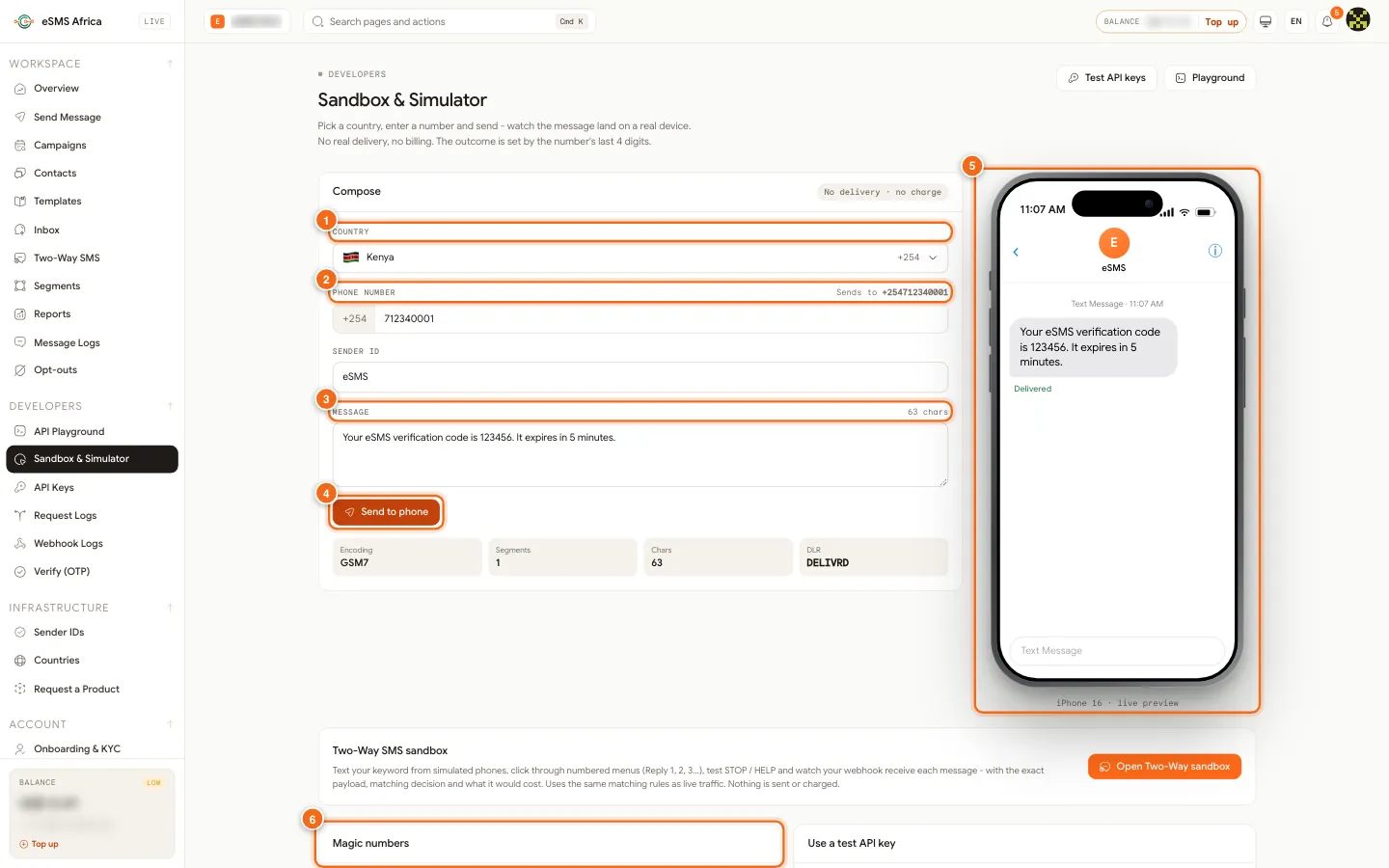
1 Country, 2 Phone number, 3 Message, 4 Send to phone, 5 iPhone live preview, 6 Magic numbers table. Test your webhooks
Test messages run through a simulated lifecycle (
queuedtosubmittedto the final status) and your delivery-report webhook fires with"livemode": false. Use that flag to keep test events out of production data. Set your URLs under Settings > Webhooks; see Webhooks and delivery reports.Test OTPs with Verify
With a test key,
POST /v1/verify/startsends no SMS. The response includes asandbox_code, and the fixed code000000always passes/v1/verify/check, which makes automated sign-up tests easy.Switch to live
Create a live key, enable each country you send to on the Countries page, top up, and swap the key. Follow the go-live checklist before your first real send.
Common errors and how to fix them
| What you see | What it means | How to fix it |
|---|---|---|
402 insufficient_balance with "livemode": false | You sent to a number ending in 0009, which simulates a low balance. | Expected. Use any other ending for a normal result. |
400 sandbox_no_schedule | Scheduled bulk sends are not supported with a test key. | Send with schedule_mode now in tests, or schedule with a live key. |
400 sandbox_no_retry | Simulated messages cannot be retried. | Send a new test message instead. |
400 destination_unavailable | The destination cannot be simulated: it is outside Africa and not offered yet. | Test with numbers in African countries, which the sandbox always covers. |
400 missing_country_code | Numbers are validated exactly like live sends. | Send in international format, for example +254712340001. |
| My live send fails but the test passed | Usually the country is not enabled or the sender ID is not approved yet. | Check the live block of a test response: it shows country_enabled and sender_approved. |
Frequently asked questions
Do test keys cost anything?
No. Nothing is sent to a network and your balance is never touched.
Do I need to enable countries for testing?
No. Test keys work for all 54 African countries without enabling. You enable countries only before live sends.
Will test messages show in my reports?
No. They are kept in a separate test log that only test keys can read, so live reports and exports stay accurate.
Can I test two-way SMS?
Yes. The Sandbox & Simulator page links to the Two-Way SMS sandbox, where simulated phones text your keyword and you can watch your webhook receive each message.
Is the response the same as live?
Yes, the shape is the same, plus environment, livemode, note and the live forecast. Your parsing code does not need a test-only branch.
Related guides
Ready? Create a free eSMS account, then create a test API key and send your first simulated message in minutes. Nothing is charged until you switch to a live key.

