Bulk SMS for NGOs reaches beneficiaries who may have basic phones and no data, in their own language, at a cost a programme budget can track. In the eSMS dashboard you import registration lists, target them by district with segments, send notices as campaigns, collect answers through a Two-Way SMS keyword and export per-recipient reports for donors.
Last reviewed: 29 October 2026
What NGOs send by SMS
- Distribution and service notices: where and when to collect items or attend a clinic.
- Training and meeting invites: the Event invite and Event reminder templates.
- Surveys and feedback: people text answers to your keyword on our shared short code.
- Field staff and volunteer alerts: urgent changes to plans.
- Awareness messages: health, safety or farming tips to people who signed up.
How to set up bulk SMS for NGOs
Request a sender ID in your organisation's name
Under Sender IDs > Request sender ID, enter a short name communities recognise (up to 11 characters) and select every country you work in. The fee for each country is shown before you submit and charged only on approval.
Import registration lists
Import each list under Contacts > Import contacts. Keep only what you need to message people: phone, first name and the fields you will target on, such as district. Invalid and duplicate numbers are skipped automatically.
Target by district with segments
Open Segments > New segment, add a filter such as the custom field "district" is "Kasese", and click Preview audience to see who matches. Choose the segment as the audience when you create a campaign.
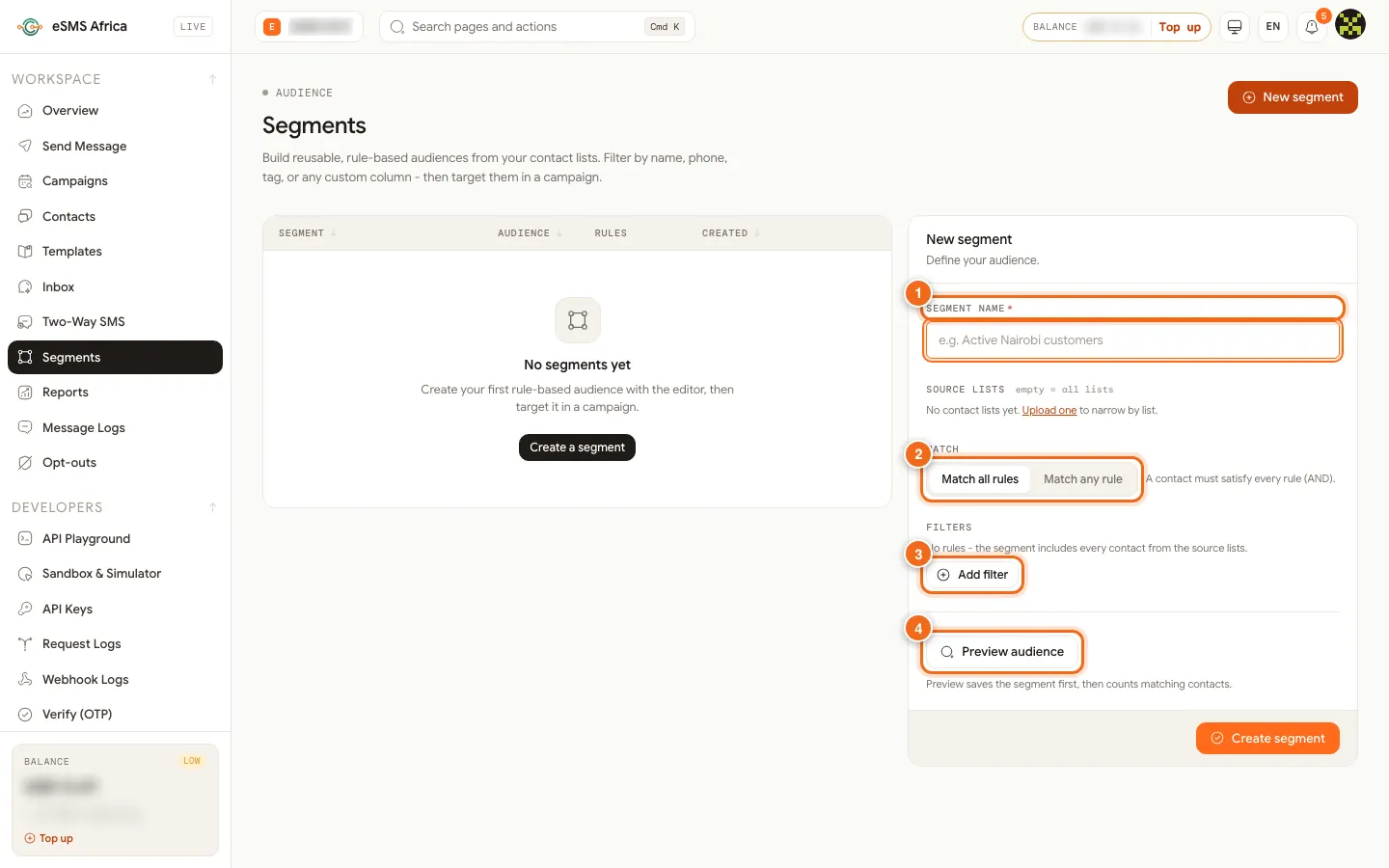
1 Segment name, 2 Match all rules / Match any rule, 3 Add filter, 4 Preview audience. Write in the language people read
Swahili, Luganda, Kinyarwanda and other languages written in the Latin alphabet usually fit the standard 160-character segment. Scripts such as Amharic or Arabic, and some accented letters, switch the message to Unicode, where a segment holds 70 characters. The composer shows the encoding and segment count as you type, and the Review step shows the estimated cost.
Collect answers with a keyword
For surveys and feedback, request a keyword under Two-Way SMS. People text your keyword and answer to the short code; their messages appear in the Inbox, and STOP and HELP are handled for you. Choose toll free where it is offered if you do not want respondents to pay.
Assign roles across the programme
Programme officers as Sender, the country director as Approver, and monitoring and evaluation staff as Viewer. With Require approval for campaigns on, large sends wait for sign-off, and the Audit log shows who sent what.
Report to donors
Export each campaign's recipients to Excel, and use Reports for totals by day and country and Spend by campaign for budget lines. Name campaigns after the activity and grant so exports are easy to match.
Sample messages
Examples with a made-up organisation. The survey sample uses our illustration short code; use the code on your approved keyword.
- Distribution notice (transactional, 124 characters):
Maji Trust: water filter distribution in Kasese is on Thu 6 Nov, 9am at the sub-county office. Bring your registration card. - Same notice in Swahili (transactional, 116 characters):
Maji Trust: ugawaji wa vichujio vya maji ni Alhamisi 6 Nov, saa 3 asubuhi, ofisi ya kata. Leta kadi yako ya usajili. - Training invite (transactional, 119 characters):
Maji Trust: training on safe water storage, Sat 8 Nov, 10am, at the parish hall. All registered households are welcome. - Survey (two-way keyword only) (transactional, 99 characters):
Maji Trust survey: is your water point working today? Text MAJI 1 for yes or MAJI 2 for no to 3450. - Awareness message (promotional, 110 characters):
Maji Trust tip: boil or filter drinking water and keep it covered. To stop these tips, tell your group leader.
Consent, quiet hours and opt-outs
Consent is required for promotional SMS. Only send offers and marketing to beneficiaries and supporters who agreed to hear from you, and keep a record of when and how they agreed (a signed form, a tick box, a registration record). Service messages they expect, such as alerts and reminders about their own account, are transactional, but they still need a correct, current number.
Rules on sender IDs, content and sending hours vary by country. Before you send, open the country on the Countries page and read its compliance notes, and check our sender ID guides for Uganda, Kenya, Tanzania.
In Settings > Messaging, switch on Hold promotional messages during quiet hours and set Quiet from and Until. Promotional messages that fall inside the window wait and go out when it ends, in each recipient's local time. Transactional messages (alerts, codes, reminders) are not held unless a campaign turns quiet hours on.
The Opt-out line in the same tab is added to promotional messages that do not already mention STOP. It starts as "Reply STOP to opt out". If your sender ID cannot receive replies, change it (up to 80 characters) to something people can act on, such as "To stop offers, call our helpline", with your real contact. The promotional samples below already contain the word "stop", so the line is not added a second time. People who opt out are listed under Opt-outs and excluded from every send; you can also add a number there by hand when someone asks in person.
Common errors and how to fix them
| What you see | What it means | How to fix it |
|---|---|---|
sender_not_approved | The sender ID you chose is not approved for that country yet. | Wait for approval, or tick "Use the country default where my sender ID isn't approved" in the campaign. |
country_not_enabled | The destination country is not switched on for your account. | An Owner or Admin opens Countries and clicks Enable for that country. |
missing_merge_field | A row has no value for a merge field and the field has no fallback. Nothing is charged. | Fill the column, or add a fallback such as {first_name|there}. |
| "Paused: balance too low" | Campaigns are charged batch by batch and the balance ran out. | Top up, then click Resume. Nobody gets the message twice. |
| Cost estimate is higher than expected | The message switched to Unicode or runs over one segment. | Check the encoding indicator and remove the character it names, or shorten the text. |
| Survey answers do not arrive | People texted the answer without your keyword and had not received a message from the code. | Ask them to start with the keyword, for example "MAJI 1". |
Frequently asked questions
Can beneficiaries reply without paying?
Where toll free is offered on the shared short code, texting you is free for them and you bear the cost. Otherwise they pay their normal SMS rate.
Can we send in local languages?
Yes. Latin-alphabet languages usually stay in the standard 160-character segment; other scripts use Unicode with 70 characters per segment.
How do we show donors who received a message?
Export the recipients of each campaign to CSV or Excel. Each row has the number, status, reason for any failure and cost.
Can field staff send from their own logins?
Yes. Invite them as Senders. Every message bills the workspace owner's wallet and is recorded in the audit log.
Related guides
Ready? Create a free eSMS account and send your first programme notice to a test group.