Delivery notification SMS tell customers their parcel is coming, when to be home and where to collect it if you missed them, which cuts failed deliveries and calls to your hub. In the eSMS dashboard you can send each day's manifest as a personalised campaign using the Out for delivery and Ready for pickup templates, give customers a delivery code with eSMS Verify, and let them reschedule by reply with a Two-Way SMS keyword.
Last reviewed: 29 October 2026
What logistics companies send by SMS
| Message | Starter template | Best sent from |
|---|---|---|
| Out for delivery | Out for delivery | A morning campaign from the day's manifest |
| Ready for pickup at a branch | Ready for pickup | A campaign per branch, or your system |
| Missed delivery | Your own template | An afternoon campaign from the failed-attempt list |
| Delivery confirmation code | - | eSMS Verify, which creates and checks the code |
| Each status change in real time | Your own templates | Your dispatch system through the API |
How to set up delivery notification SMS
Request your sender ID
Under Sender IDs > Request sender ID, use the brand on your vans and receipts (up to 11 characters). If you deliver for online shops, consider sending under your own name and naming the shop in the text.
Add the delivery templates
Open Templates and use the Starter pack to add Out for delivery and Ready for pickup to your library. Edit them to include your tracking number column and hub hours.
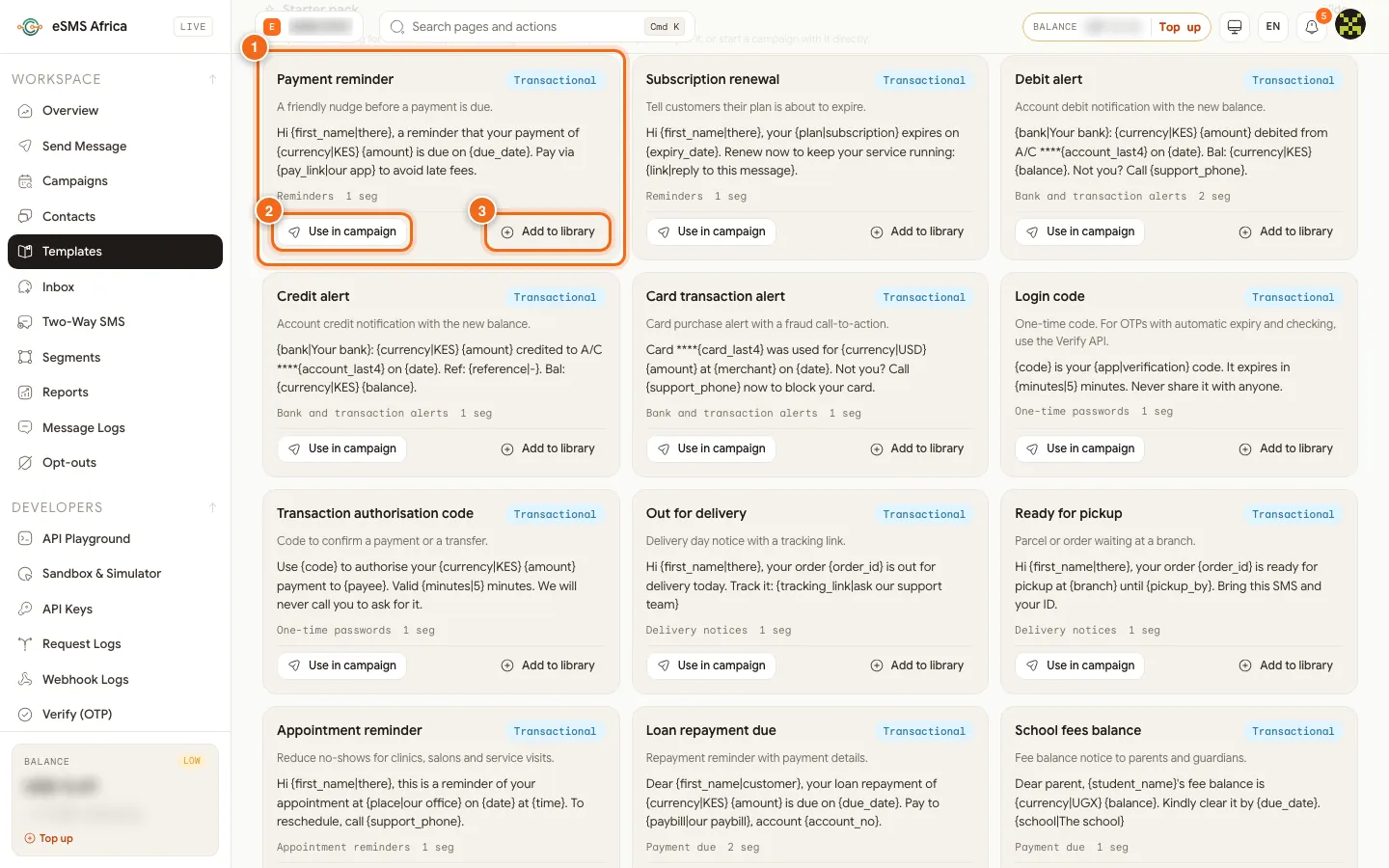
1 A starter template, 2 Use in campaign, 3 Add to library. Send the morning manifest
Each morning, start a New campaign, upload the manifest and pick the phone column; tracking number, branch and date become merge fields. Choose Transactional and check the preview rows, then Send now. Use Duplicate the next day to keep the settings.
Spread the send to match rider capacity
In Delivery controls, a Throttle (messages per minute) spaces the messages so calls from customers come in steadily to your hub.
Give customers a delivery code
If riders confirm hand-over with a code, send it with eSMS Verify, which creates the code, sends it and checks the one the rider enters. Your developers can follow Send and check OTPs with eSMS Verify.
Let customers reschedule by reply
Request a keyword under Two-Way SMS. When your system texts customers from the short code, their replies such as 1 or 2 come back for the next 72 hours and appear in the Inbox, where your hub team can answer.
Chase failures
In the campaign report, select Failed in the Recipients section and export it. Hand the list to riders or the call centre to confirm numbers before the vehicle leaves.
Sample messages
Examples with a made-up courier.
- Out for delivery (transactional, 123 characters):
Haraka Express: parcel HX20488 is out for delivery today. Our rider will call before arriving. Cash on delivery: KES 1,500. - Ready for pickup (transactional, 124 characters):
Haraka Express: parcel HX20488 is ready for pickup at our Mombasa Road hub until 3 Nov, 8am-6pm. Bring this SMS and your ID. - Missed delivery (transactional, 118 characters):
Haraka Express: we missed you today. Parcel HX20488 will be delivered again tomorrow. Call the hub to change the time. - Delivery code (sent by eSMS Verify) (transactional, 103 characters):
Your Haraka Express delivery code is 5821. Give it to the rider only when you have your parcel in hand.
Consent, quiet hours and opt-outs
Consent is required for promotional SMS. Only send offers and marketing to customers who agreed to hear from you, and keep a record of when and how they agreed (a signed form, a tick box, a registration record). Service messages they expect, such as alerts and reminders about their own account, are transactional, but they still need a correct, current number.
Rules on sender IDs, content and sending hours vary by country. Before you send, open the country on the Countries page and read its compliance notes, and check our sender ID guides for Kenya, Nigeria, Uganda.
In Settings > Messaging, switch on Hold promotional messages during quiet hours and set Quiet from and Until. Promotional messages that fall inside the window wait and go out when it ends, in each recipient's local time. Transactional messages (alerts, codes, reminders) are not held unless a campaign turns quiet hours on.
The Opt-out line in the same tab is added to promotional messages that do not already mention STOP. It starts as "Reply STOP to opt out". If your sender ID cannot receive replies, change it (up to 80 characters) to something people can act on, such as "To stop offers, call our helpline", with your real contact. The promotional samples below already contain the word "stop", so the line is not added a second time. People who opt out are listed under Opt-outs and excluded from every send; you can also add a number there by hand when someone asks in person.
Common errors and how to fix them
| What you see | What it means | How to fix it |
|---|---|---|
sender_not_approved | The sender ID you chose is not approved for that country yet. | Wait for approval, or tick "Use the country default where my sender ID isn't approved" in the campaign. |
country_not_enabled | The destination country is not switched on for your account. | An Owner or Admin opens Countries and clicks Enable for that country. |
missing_merge_field | A row has no value for a merge field and the field has no fallback. Nothing is charged. | Fill the column, or add a fallback such as {first_name|there}. |
| "Paused: balance too low" | Campaigns are charged batch by batch and the balance ran out. | Top up, then click Resume. Nobody gets the message twice. |
| Customers say they got the message twice | The same manifest was uploaded to two campaigns. | Check Campaigns before sending; duplicates inside one file are skipped automatically. |
| Many numbers fail on one network | A network problem or a sender ID not registered on that network. | Check the By network table in the campaign report and the sender ID status for that country. |
Frequently asked questions
Can updates go out automatically as parcels move?
Yes. Your developers connect your dispatch system to the eSMS API so each scan sends a message. The dashboard suits daily batches and one-off notices.
Are delivery notifications held by quiet hours?
No. Transactional messages go out at any hour unless the campaign turns quiet hours on.
Can customers reply to change a delivery time?
Yes, with a Two-Way SMS keyword on our shared short code. Their replies appear in the Inbox.
How do I find customers whose messages failed?
Open the campaign report, select the Failed tab in Recipients and export it to CSV or Excel.
Related guides
Ready? Create a free eSMS account and send tomorrow's out-for-delivery messages from your manifest.