A sender ID is the name your customers see instead of a phone number. Every verified eSMS account gets a default sender ID for its home country with no approval needed, so you can send today. For your own brand name, sender ID registration is per country: request it on the Sender IDs page, we review it with the networks, and the fee is charged only if it is approved.
Last reviewed: 29 October 2026
How sender ID registration works
Check your default sender ID
Open Sender IDs under INFRASTRUCTURE. The box Your default sender ID: eSMSAfrica (1) explains that this name is applied automatically for your home country when you send without choosing a sender, with no approval needed.
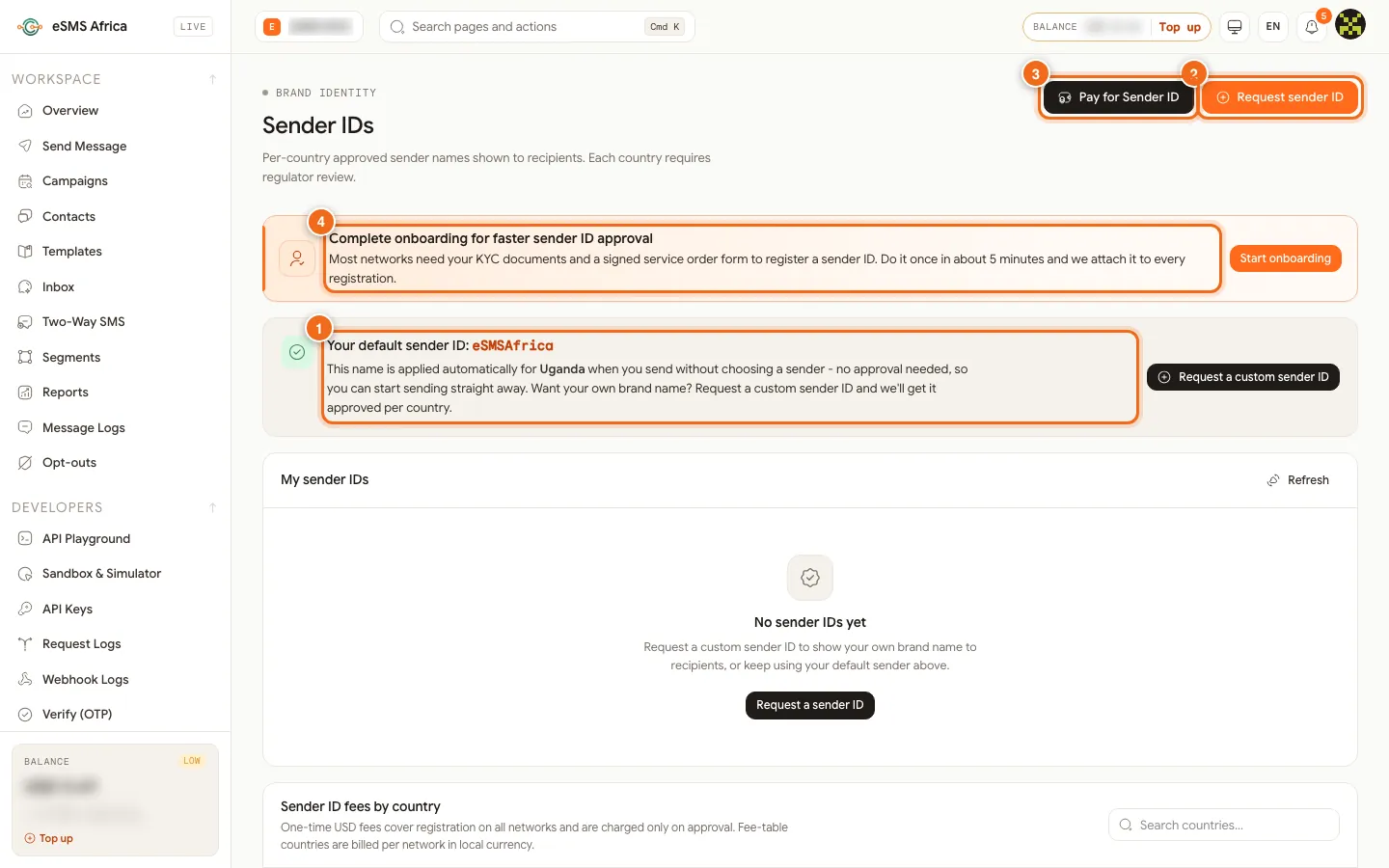
1 Your default sender ID, 2 Request sender ID, 3 Pay for Sender ID, 4 Complete onboarding for faster sender ID approval. Open Request sender ID
Click Request sender ID (2). A side panel opens with the hint "1-11 characters - letters and digits".
Type the sender name
In Sender name (1), type the name exactly as recipients will see it, up to 11 characters. Quick pick (2) offers ready names such as eSMSAfrica and eSMS.
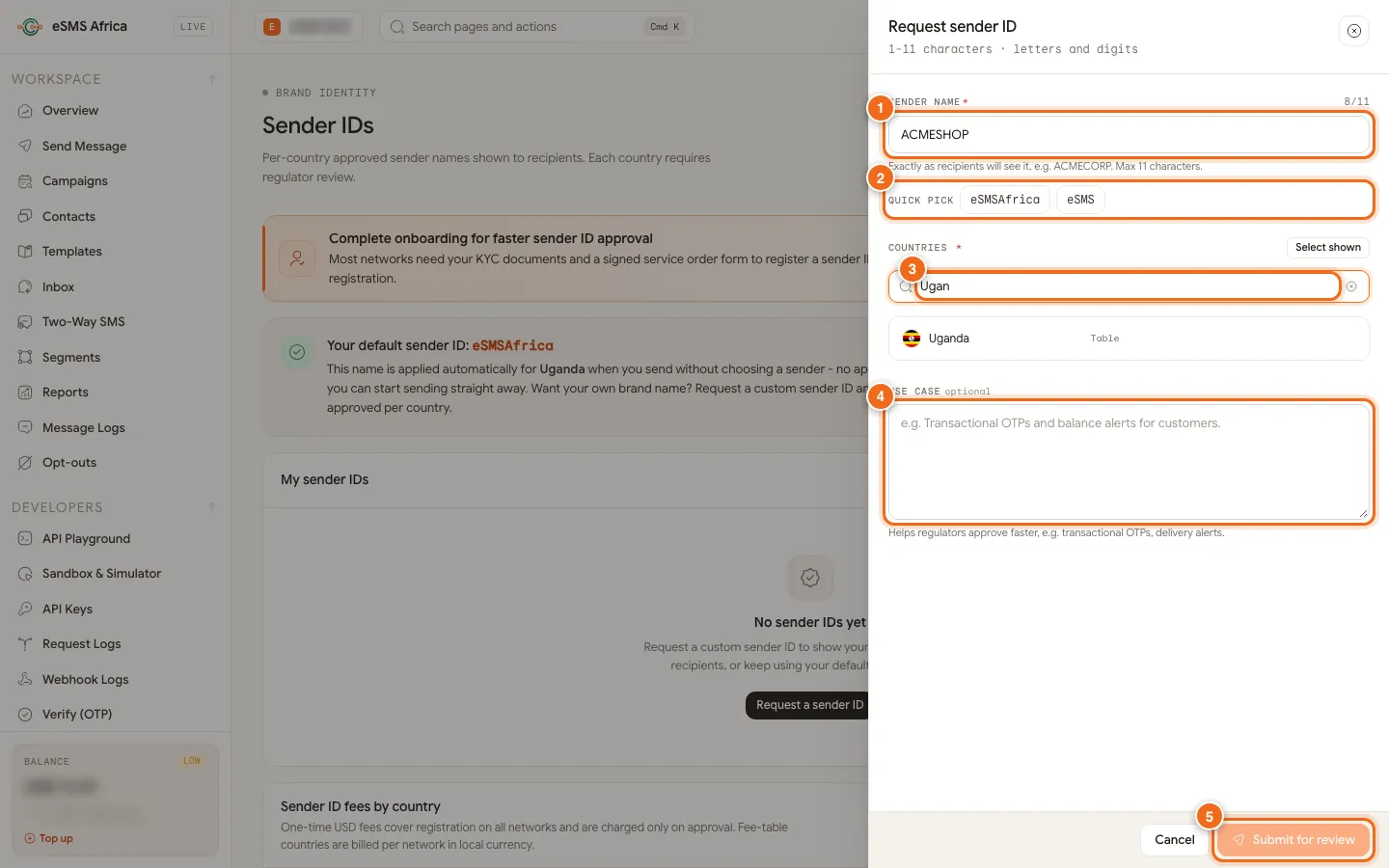
1 Sender name, 2 Quick pick, 3 Countries with each fee, 4 Use case (optional), 5 Submit for review. Choose the countries
Under Countries (3), search and tick each country where you will use the name. Each country shows its fee; some show Table, meaning fees are billed per network in local currency as listed in the fee table. Select all ticks every country.
Describe the use and submit
Add a Use case (4), for example "transactional OTPs and delivery alerts"; it helps regulators approve faster. Click Submit for review (5). A message confirms the request and the fee that will be charged only if it is approved.
Track the status
Your request appears under My sender IDs as Pending, then Approved or Rejected (with the reason). Action needed means we need something from you; read the note on the request. Once approved, the name appears in the Sender ID list on Send Message and in the campaign wizard.
Common errors and how to fix them
| What you see | What it means | How to fix it |
|---|---|---|
| Use letters and digits only | The name has spaces, dots or other symbols. | Remove them, for example ACME SHOP becomes ACMESHOP. |
| sender_not_approved | You sent with a sender ID that is not approved for that country. Nothing was sent. | Use the default sender, wait for approval, or in campaigns tick "Use the country default where my sender ID isn't approved". |
| Rejected: (reason) | The networks or regulator refused the name. | Read the reason, adjust the name or use case, and request again. |
| Action needed | We need more information or documents. | Open the note on the request and reply, or finish onboarding. |
| Failed to submit | The request did not save. | Check that a name and at least one country are chosen, then try again. |
Frequently asked questions
Can I send before my custom sender ID is approved?
Yes. Your default sender works in your home country with no approval, so you can start straight away.
When am I charged the sender ID fee?
Only when the sender ID is approved. Nothing is charged if it is rejected, unless you chose to pre-pay, in which case the amount is held on the request.
How long can a sender ID be?
Up to 11 characters, letters and digits only.
Do I need onboarding to get a sender ID?
It is currently optional, but most networks ask for KYC documents and a signed service order form, so finishing onboarding speeds up approval.
Do I need a separate request for each country?
One request can cover many countries; tick each country in the panel. Each is approved per country.
Related guides
Ready? Create a free eSMS account and send today with your default sender while your brand name is reviewed.