To pay for a sender ID, open Sender IDs > Pay for Sender ID, choose your pending request, check the amount, which is fixed to the fee due, and pay it once with mobile money, Mukuru or crypto. The money is held on the request and the fee must be paid in full before approval; your SMS credit is not used.
Last reviewed: 29 October 2026
How to pay for a sender ID
Open Pay for Sender ID
In the left menu under INFRASTRUCTURE, click Sender IDs, then Pay for Sender ID. The same button is on the Overview page.
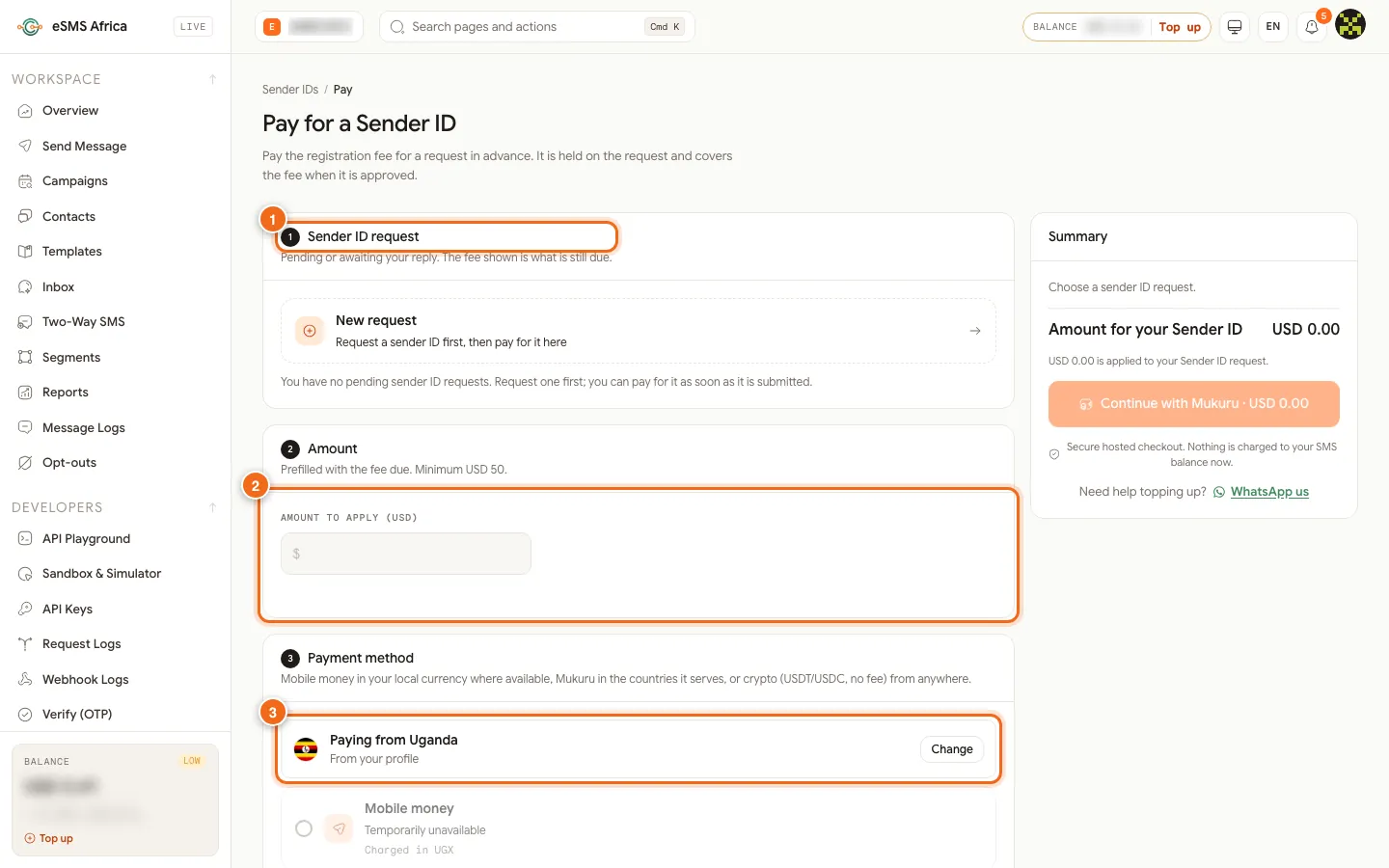
1 Step 1 Sender ID request, 2 Step 2 What you pay, 3 Step 3 Payment method. Choose the request
Under 1 Sender ID request, pick the request to pay for. Only requests that are pending or awaiting your reply are listed, with the fee still due. If you have none, you see "Request a sender ID first, then pay for it here" and a New request button.
Check the amount
Under 2 What you pay, the amount is fixed to the fee due. A fee is one payment, in full, and any other amount is refused. If a country on the request is not available yet, the page says so, you are not charged and the request cannot be paid for now.
Choose how to pay
Under 3 Payment method, check the country shown in "Paying from" (click Change if it is wrong) and pick Mobile money (charged in local currency where available), Mukuru or Crypto (USDT on Tron TRC20 or USDC, no fee). The summary shows the sender name, country, networks covered, the fee, the 5% processing fee for mobile money and Mukuru, and one total in USD and your currency. A mobile money checkout may add its own charge, which it shows before you confirm and which you pay on top.
Complete the payment
For mobile money, click the pay button and finish in the secure checkout. For Mukuru, you see the recipient, mobile number, receive method and amount to send; after sending, enter your Mukuru reference / transaction number and the amount you sent (a receipt screenshot is optional). For crypto, send the exact coin on the network shown to the deposit address, then enter the Transaction hash (TxID). Mukuru and crypto payments are confirmed by our team, and we email you.
What happens to the money
- While the request is pending, the payment is held on the request. It is not added to your SMS balance.
- Your SMS credit is not used for the fee.
- On approval, it covers the fee.
- If the request is rejected or deleted, the held amount goes to your SMS balance.
- A payment that arrives after the request was already approved, rejected or removed is credited to your SMS balance.
Common errors and how to fix them
| What you see | What it means | How to fix it |
|---|---|---|
| Message that the country is not available yet | We cannot send messages to that country today. | You have not been charged. Wait until it is available, or request the other countries separately. |
| "You have no pending sender ID requests." | There is nothing to pay for yet. | Click New request, submit the sender ID, then come back. |
| Mobile money shows "Temporarily unavailable" | Mobile money cannot be used for your country right now. | Pay with Mukuru or crypto, or try again later. |
| The request you want is not in the list | It is already approved, rejected or was deleted. | Check its status under My sender IDs. |
Frequently asked questions
Do I have to pay for a sender ID before approval?
Yes. Registration needs the fee paid in full before approval.
Is the sender ID payment taken from my SMS balance?
No. Pay for Sender ID holds the money on the request. Your SMS credit is not used for Sender ID fees.
What if my sender ID is rejected?
The amount held on the request goes to your SMS balance, so you can use it for messages or another request.
How much is the sender ID fee?
USD 100 one-time in most countries, USD 212.57 one-time in Kenya and USD 268 in Uganda, covering all networks. Fees are shown per country on the Sender IDs page and at /sender-id/<country>.
Can I pay by card?
No. Use mobile money where available, Mukuru, or crypto.
Related guides
Ready? Create a free eSMS account, request your sender ID and pay for it.