Personalised SMS put each customer's own details into the message. Write {first_name} or {amount} in your text and eSMS fills it from the matching column of your file or contact group. Add a fallback, such as {first_name|there}, so a row with an empty cell still reads well.
Last reviewed: 29 October 2026
How to send personalised SMS with merge fields
Load your audience
Start a campaign (Campaigns, New campaign) and add your file on Audience. Under Merge fields (3) each extra column is listed with the field name it becomes, for example amount and due_date.
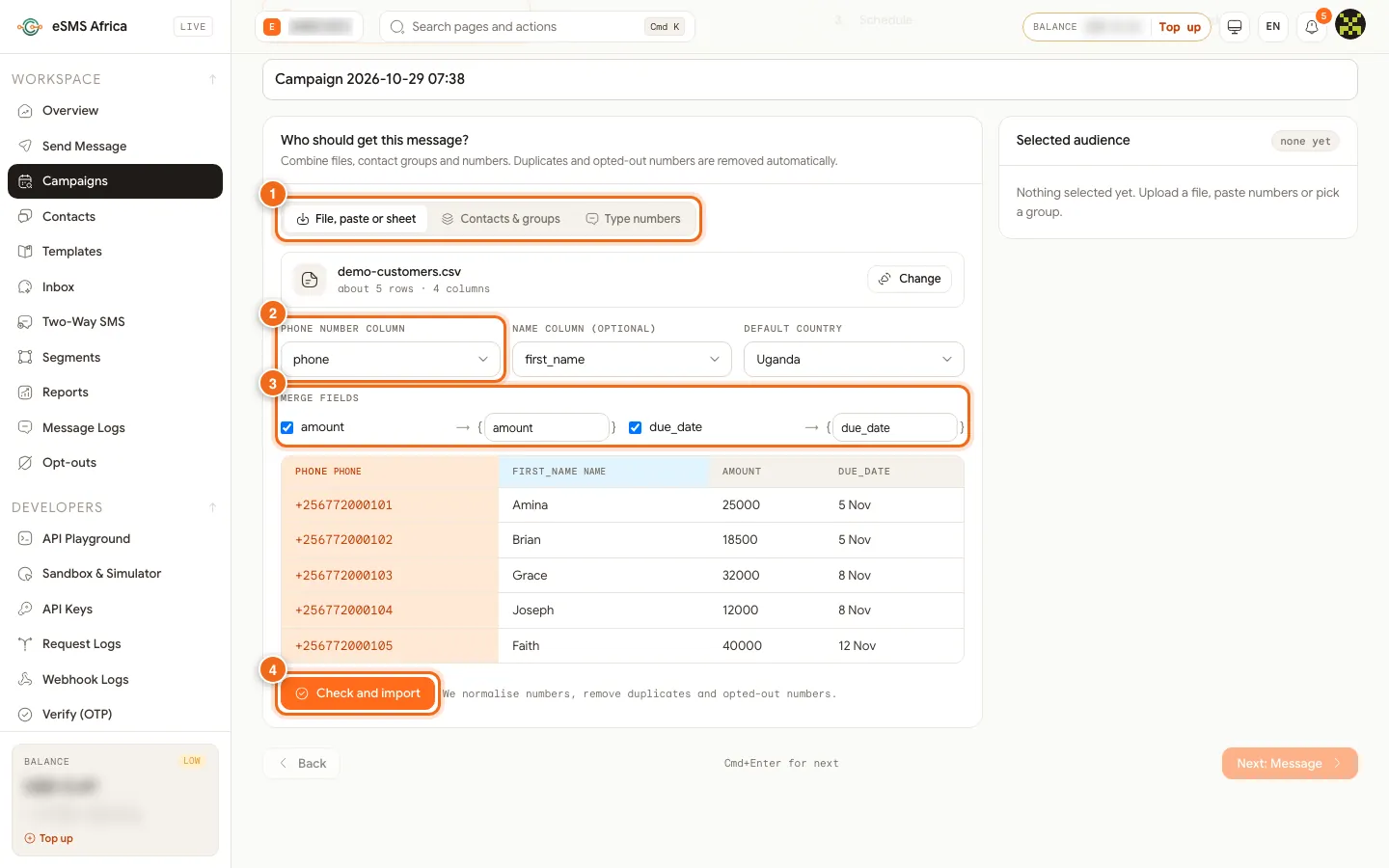
1 Source tabs, 2 Phone number column, 3 Merge fields from your columns, 4 Check and import. Insert the fields
On Message, click a chip (2) such as {first_name}, {amount} or {due_date} to insert it where the cursor is (1). You can also type the field in curly brackets.
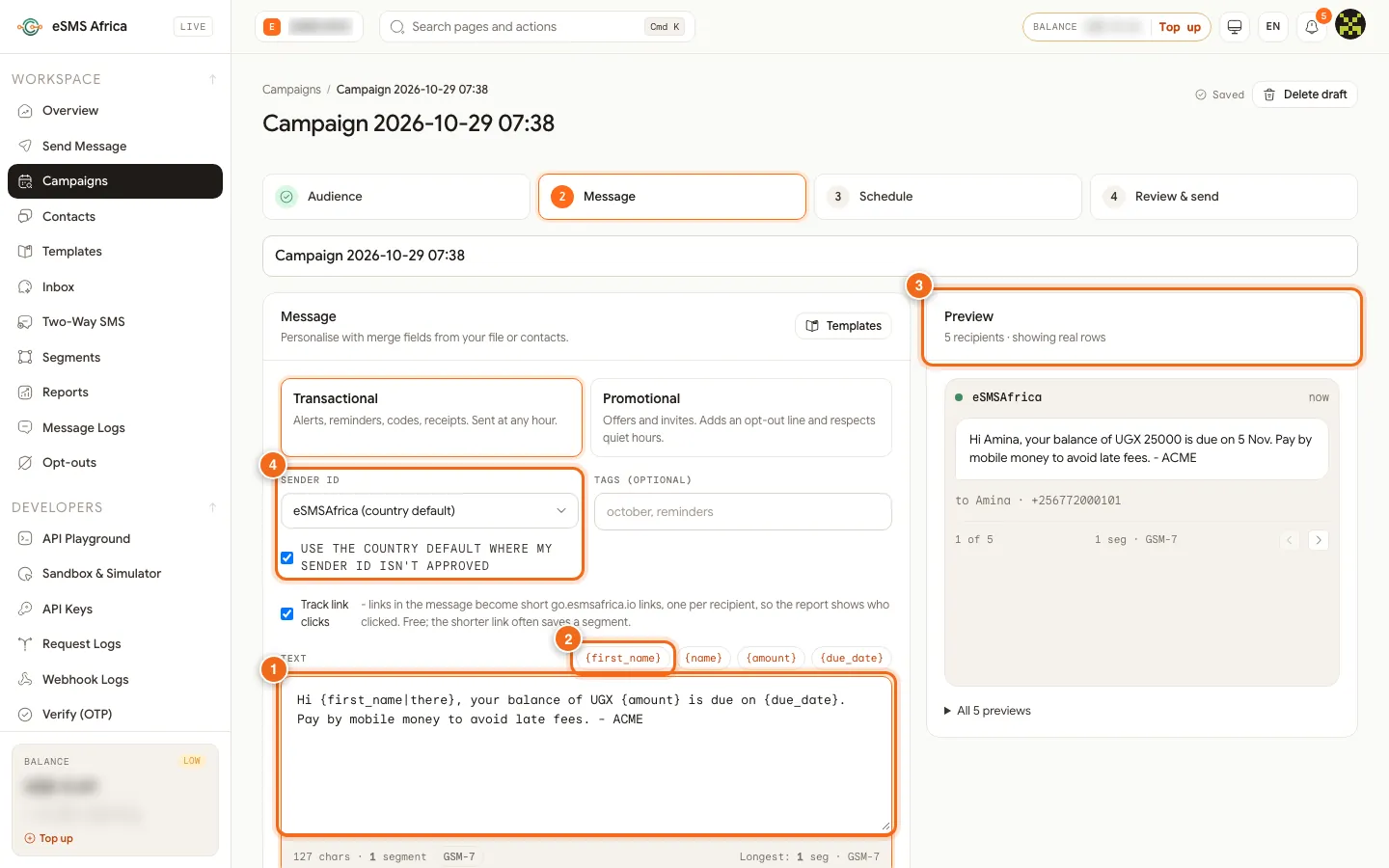
1 Text box with merge fields, 2 Merge-field chips, 3 Preview with real rows, 4 Sender ID. Add fallbacks
Type a vertical bar and a default inside the brackets:
{first_name|there}gives "Hi there" when a name is missing, and{amount|0}gives 0. A name column is split automatically into{first_name}and{last_name}, and{name}and{phone}are always available.Preview real rows
The Preview (3) says "showing real rows". Use the arrows to page through your recipients and read each finished message. The counter shows segments for the template, and Longest shows the biggest real message.
Fix warnings
An Unknown merge field banner means a field is not in your audience. Some rows have empty fields tells you how many recipients have a blank cell and suggests a fallback.
Review and send
Go on to Schedule and Review & send, send yourself a test, then send.
Field names at a glance
| Column header in your file | Merge field |
|---|---|
| First Name | {first_name} |
| Due Date | {due_date} |
| Amount | {amount} |
| Name (full name) | {name}, {first_name}, {last_name} |
Example
File columns: phone, first_name, amount, due_date. Message: Hi {first_name|there}, your balance of UGX {amount} is due on {due_date}. Pay by mobile money to avoid late fees. - ACME. A row for Amina with 25000 and 5 Nov becomes "Hi Amina, your balance of UGX 25000 is due on 5 Nov...".
Common errors and how to fix them
| What you see | What it means | How to fix it |
|---|---|---|
| Unknown merge field | The field is not a column in your audience, often a spelling difference. | Pick a field from the chips or add a fallback like {field|...}. |
| Some rows have empty fields | Some recipients have a blank cell for that field and would see a blank. | Add a fallback, e.g. {amount|0}, or fill the cells in your file. |
| missing_merge_field | A personalised send was stopped because recipients had no value for a field and no fallback. Nothing was sent or charged. | Add a fallback or fix the data, then send again. |
| Message over 10 segments | A personalised message became too long for some rows. | Shorten the text or the values in that column. |
Frequently asked questions
What is a merge field?
A placeholder in curly brackets, such as {first_name}, that is replaced by each recipient's value from your list.
How do I name my columns?
Use the column header in your file. Headers are turned into lower case with underscores, so "Due Date" becomes {due_date}.
What if a cell is empty?
Add a fallback with a vertical bar, such as {first_name|Customer}. Without one, the wizard warns you before sending.
Can I use merge fields in templates?
Yes. Templates support the same fields and fallbacks, and the field names come from your file's column headers.
Related guides
Ready? Create a free eSMS account and send your first personalised campaign.