Two-way SMS lets your customers text you and get answers from the same number. In eSMS you request your own keyword on our shared short code (for example CAREDEY on 3450), customers text the keyword to start a conversation, and their messages arrive in your Inbox, where you can reply. Nothing is charged until we approve your request.
Last reviewed: 29 October 2026
How to set up two-way SMS
Open Two-Way SMS
In the left menu, click Two-Way SMS and then Request a keyword. A panel opens with the note "Nothing is charged until we approve your request."
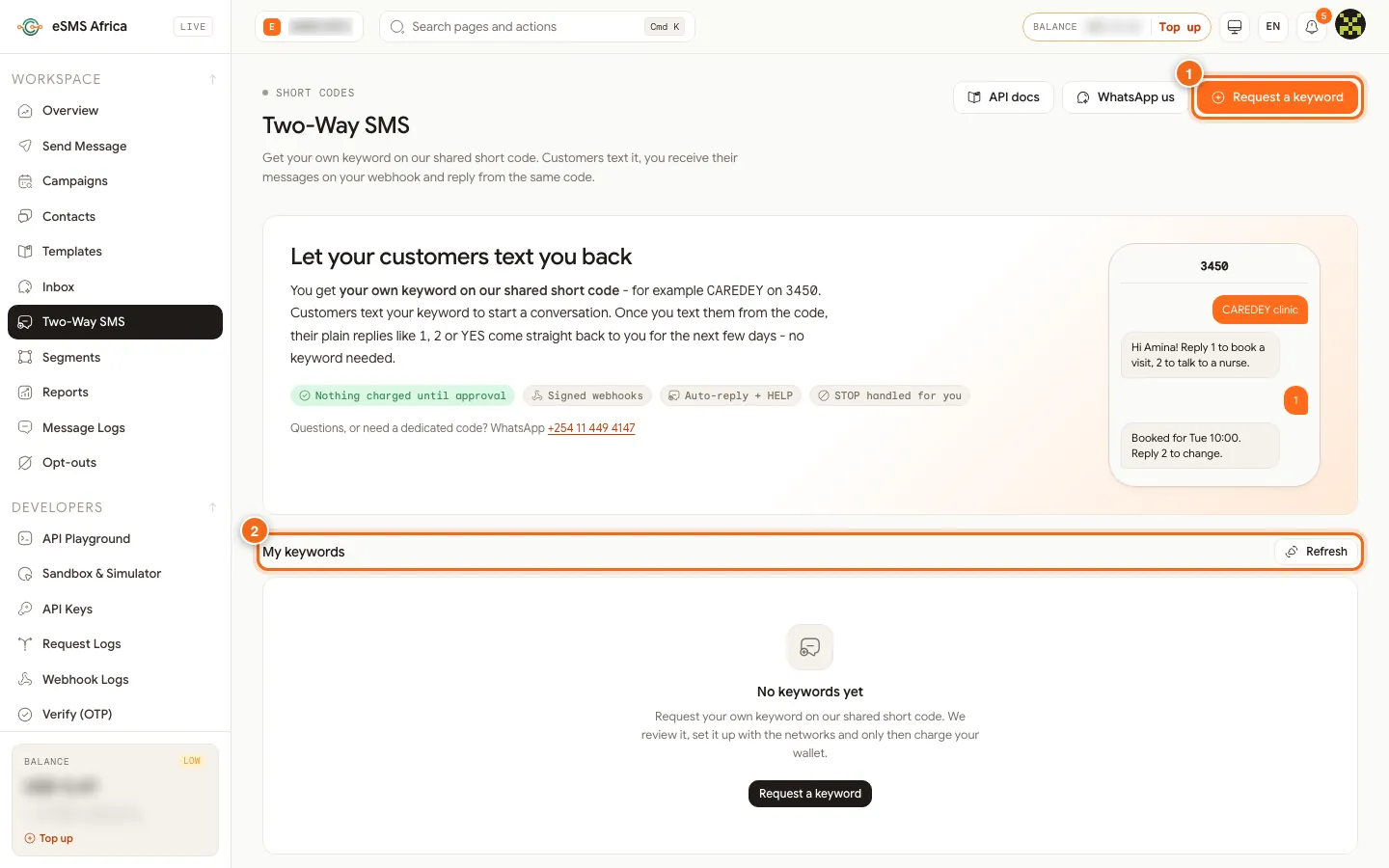
1 Request a keyword, 2 My keywords. Choose the country
Pick the country your customers are in. Countries you can request yourself come first; the others are arranged by our team, who confirm availability and pricing before anything is charged.
Choose your keyword and short code
Keep Any shared code or pick a listed short code, then type your Keyword: 2 to 20 letters or digits with at least one letter. We upper-case it and check it is free on that code. STOP, START, HELP, INFO and similar words are reserved, and numbers-only keywords are not allowed because numbered replies (1, 2, 3) are kept for menus.
Choose who pays for incoming texts
Where toll free is offered you see a Billing step. Standard rated means customers pay their normal SMS rate to text you. Toll free means texting you is free for them and you bear the cost.
Add your business details
Fill in Company / business name and Use case (at least 20 characters; networks review it before approving). Upload your KYC documents or paste a link to them. Your developer can add a webhook address here too, or leave it empty.
Review the fees and submit
The Review step shows the one-time setup fee and the monthly fee, and what is "Due on approval". Click Request a keyword (or Send request for countries arranged by our team). Your keyword appears under My keywords as Pending review, and becomes Active once approved. Until then you can withdraw the request; nothing has been charged.
Read and answer messages in the Inbox
Click Inbox in the left menu. Use All or Short codes, or search by number, text or keyword. Pick a conversation, type in the reply box ("Reply from 3450...") and click Send. Your reply goes out from the short code.
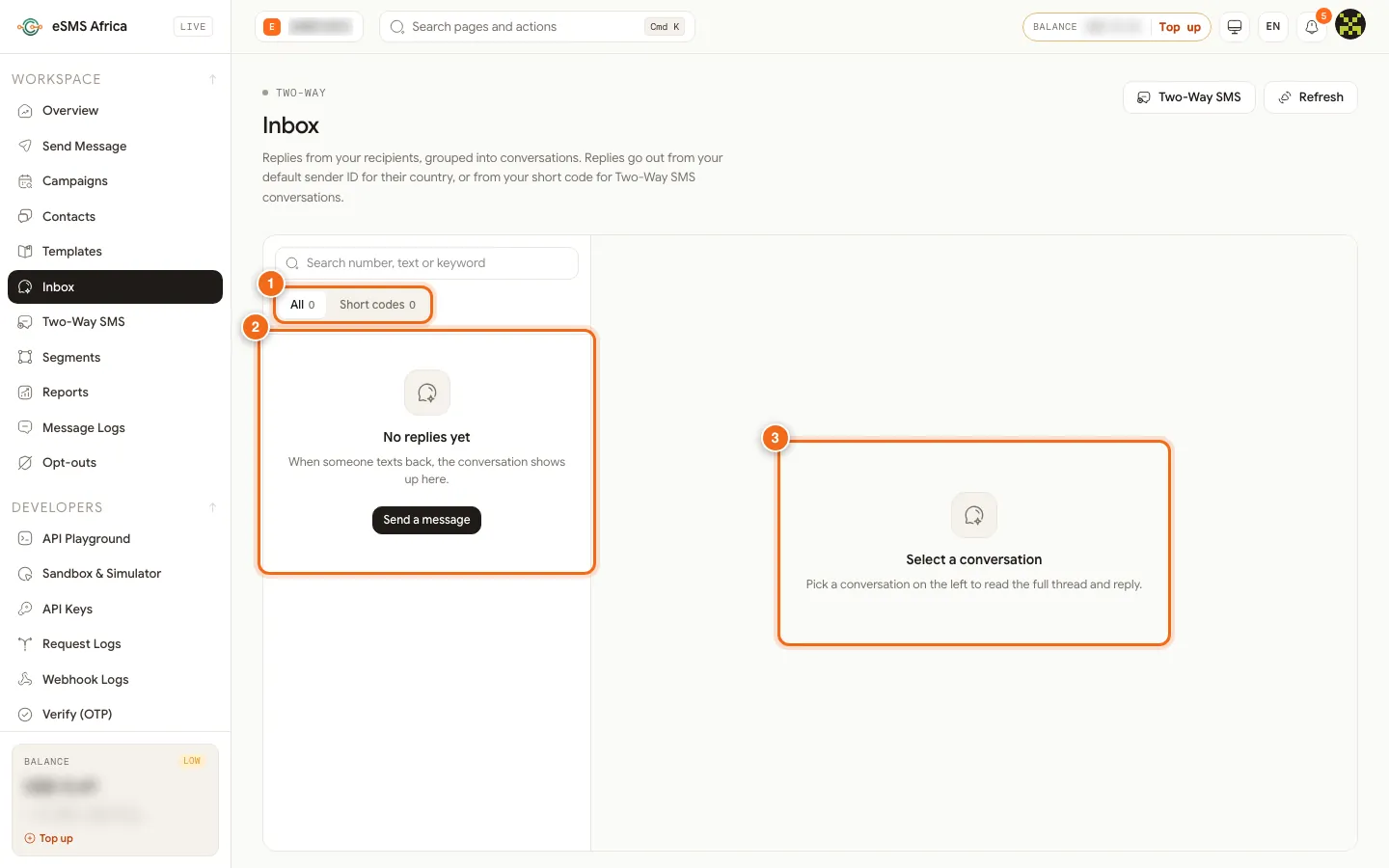
1 Filters All and Short codes, 2 conversation list, 3 conversation pane.
How keywords, replies and STOP work
- Customers start with your keyword, for example "CAREDEY hi" to 3450. Matching is not case sensitive, and every message that starts with your keyword reaches only you.
- After you text a customer from the code, their plain replies such as 1, 2 or YES come back to you for the next 72 hours with no keyword needed. This is ideal for menus, bookings and surveys.
- "CAREDEY STOP" stops your keyword; a bare "STOP" stops everything from the code. HELP returns your help text. We block messages to opted-out numbers for you.
- Need a dedicated short code for your brand alone? WhatsApp us on +254 114 494147 and we will arrange it.
Common errors and how to fix them
| What you see | What it means | How to fix it |
|---|---|---|
| "Already taken on this short code" | Another business uses that keyword on the code. | Try another keyword, or pick a different short code. |
| "Describe your use case in at least 20 characters" | The Use case box is too short. | Explain what customers will text and what you will reply. |
| "Add at least one KYC document (upload or link)" | Self-service countries need documents before review. | Upload a PDF, PNG, JPG or WEBP up to 5 MB, or paste a link. |
| Keyword status Suspended | The monthly fee could not be taken. Messages are stored but not forwarded. | Top up. It resumes automatically. |
| No Request a keyword button works for you | Your role is not Owner or Admin. | Ask the workspace owner or an admin to submit the request. |
Frequently asked questions
How much does two-way SMS cost?
Each country has a one-time setup fee, a monthly keyword fee and per-message prices for inbound and outbound texts. They are listed in the Pricing by country table on the Two-Way SMS page; setup and the first month are charged only on approval.
When am I charged?
Only when we approve your request. Setup and the first month are then taken from your wallet. You can withdraw a pending request at no cost.
Do my customers need to type the keyword every time?
No. Once you have texted them from the code, their plain replies reach you for the next 72 hours without the keyword.
Where do replies appear?
In the Inbox in the dashboard, grouped into conversations. Your developer can also receive them in your own system.
Can I get a short code just for my brand?
Yes. A dedicated short code is arranged by our team; WhatsApp +254 114 494147 to ask.
Related guides
Ready? Create a free eSMS account and request your keyword. Nothing is charged until it is approved.