A low balance alert warns you by email, in the dashboard or both when your SMS balance falls below an amount you choose, so campaigns do not pause unexpectedly. Turn it on, with other alerts such as Delivery rate drop and Campaign completed, on the Alerts page under ACCOUNT; everything that fires is collected on the Notifications page.
Last reviewed: 29 October 2026
How to set up a low balance alert
Open Alerts
In the left menu under ACCOUNT, click Alerts. The page says "Changes save automatically" and shows how many alerts are on, for example "0 of 7 on".
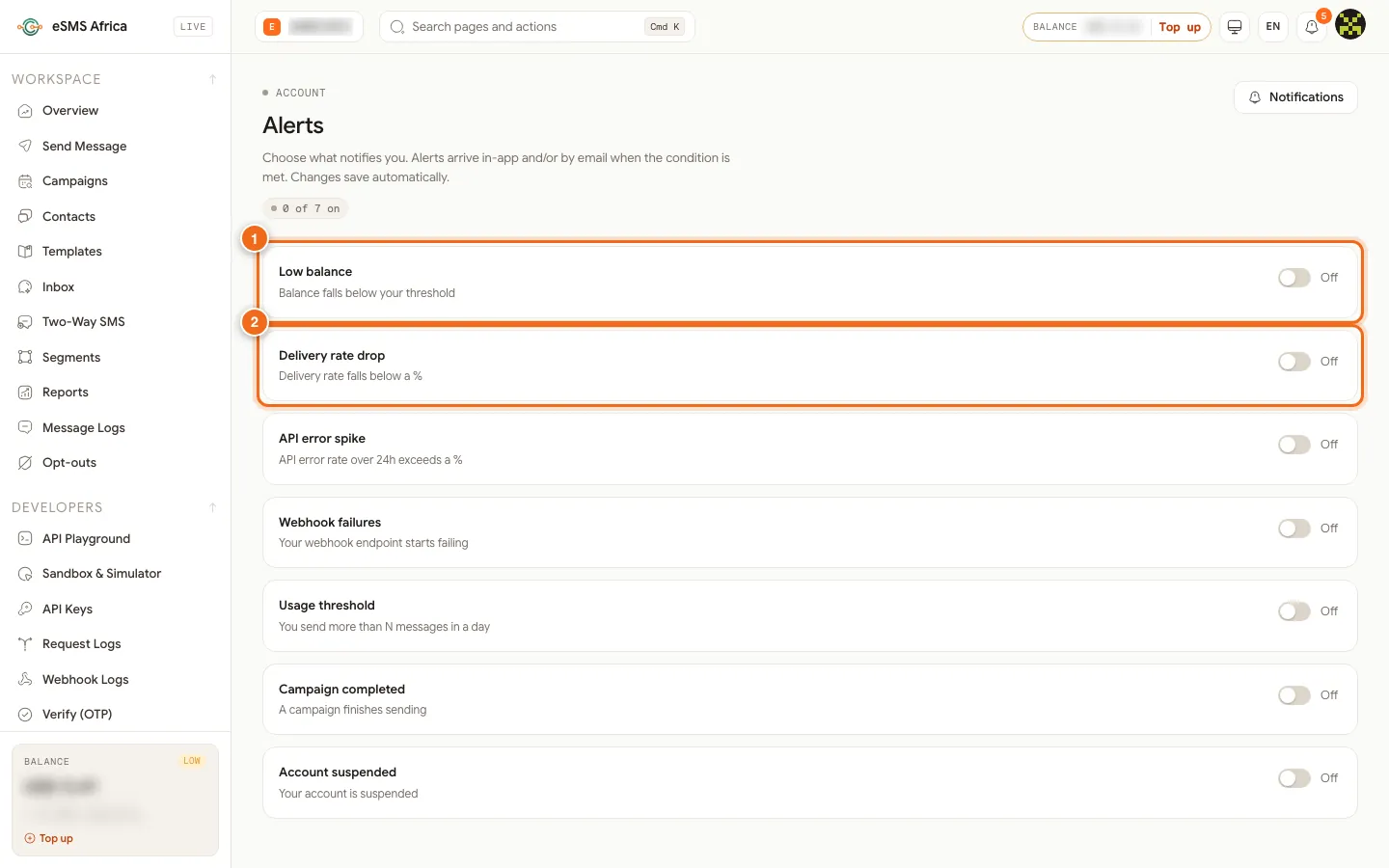
1 Low balance, 2 Delivery rate drop. Turn on Low balance
Click the switch next to Low balance ("Balance falls below your threshold"). An Alert below (amount) box appears, set to 5 in your wallet currency. Change it to an amount that gives you time to top up, then press Enter or click away. You see "Saved".
Choose how it reaches you
In Deliver via, pick In-app + email, In-app only or Email only.
Turn on the other alerts you need
Delivery rate drop fires when delivery over the last 24 hours falls below a percentage (90 to start; it needs at least 20 messages in that time). Usage threshold fires when you send more than a number of messages in a day (1,000 to start), useful to catch a runaway send. Campaign completed tells you when a campaign finishes. Account suspended tells you if sending is blocked. API error spike and Webhook failures are for your developers.
Read and manage notifications
The bell in the top bar shows how many notifications are unread. Click it, or open Notifications under ACCOUNT, to see them grouped by date. Filter by All, Unread, Sender ID, Billing, Two-way, Delivery or System, click Open to go to the related page, and use Mark all read or Clear all to tidy up.
Common errors and how to fix them
| What you see | What it means | How to fix it |
|---|---|---|
| "Enter a value to save" | The alert is on but the threshold box is empty. | Type a number and press Enter. |
| "Couldn't save that change" | The change was not saved, often a connection problem. | Try again. The list reloads with the saved settings. |
| Delivery rate drop never fires | Fewer than 20 messages were sent in the last 24 hours, or the rate is above your threshold. | Nothing to fix. It only checks once there is enough traffic. |
| No alert emails arrive | Deliver via is set to In-app only, or the email went to spam. | Choose In-app + email and add eSMS to your safe senders. |
| The switches cannot be changed | Your role is not Owner or Admin. | Ask the owner or an admin to set alerts. |
Frequently asked questions
What is a good low balance threshold?
Pick an amount that covers at least a few days of normal sending, so there is time to top up before a campaign pauses.
Is there automatic top-up instead?
Automatic top-up is not currently available. A low balance alert is the way to stay ahead.
How often can an alert fire?
Once it fires, the same alert waits 6 hours before it can fire again.
What is the difference between Alerts and Notifications?
Alerts are the rules you switch on. Notifications is the list of messages they and the system send you, such as payments received and campaign results.
Will a campaign stop if my balance runs out?
It pauses and you are notified. Top up and click Resume; it continues where it stopped.
Related guides
Ready? Create a free eSMS account and switch on a low balance alert before your first campaign.