The eSMS SMS dashboard at sms.esmsafrica.io is where you send messages, run campaigns, manage contacts and watch delivery. The Overview page shows your balance, today's numbers and shortcuts, and the left menu takes you to everything else. This tour shows where each part is and what it is for.
Last reviewed: 29 October 2026
How to find your way around the SMS dashboard
Open the Overview page
Sign in at sms.esmsafrica.io. You land on Overview, with a greeting, the date and a one-line summary of the last 14 days, for example how many messages you sent and what share was delivered.
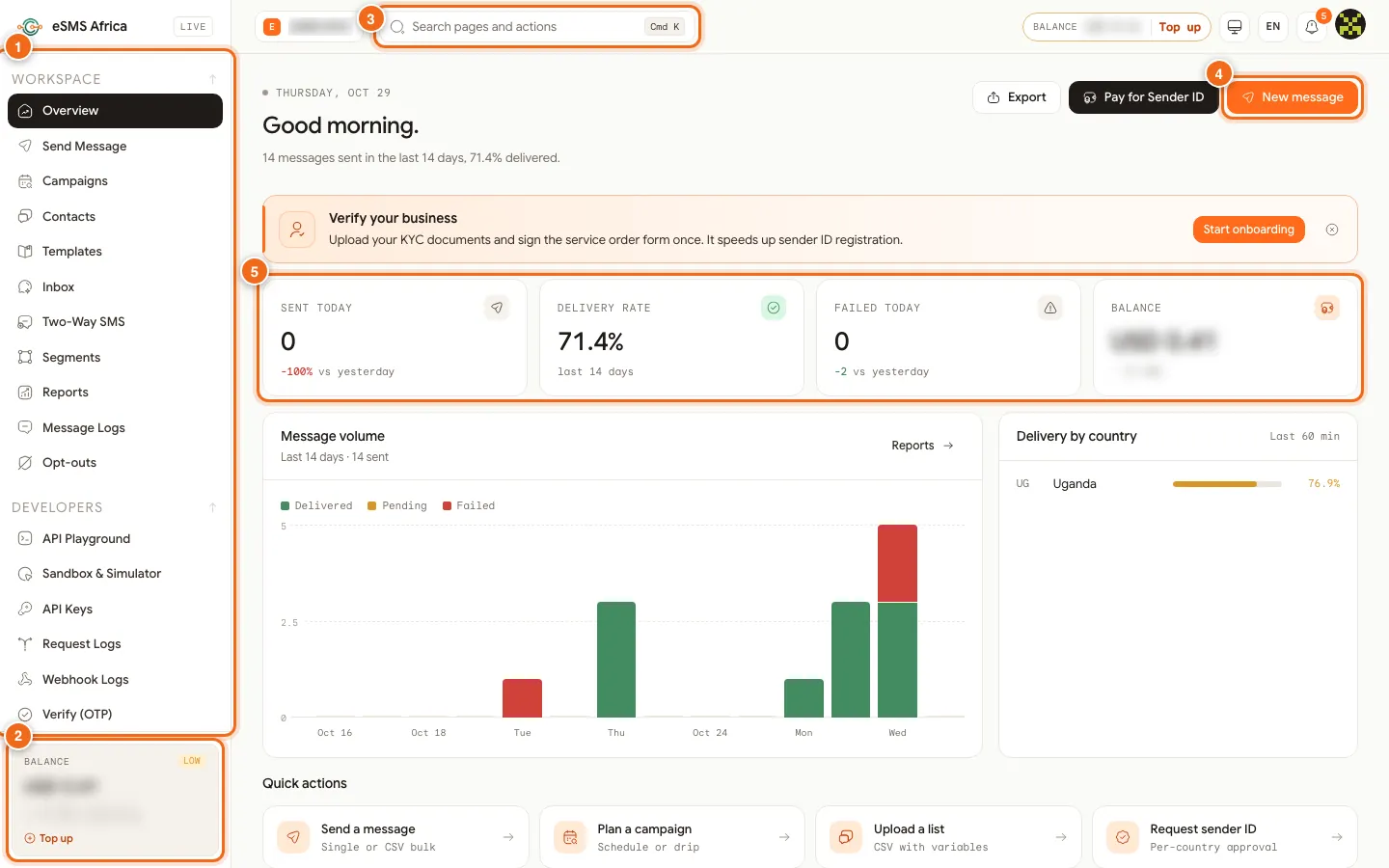
1 Left menu, 2 Balance card with Top up, 3 Search pages and actions, 4 New message, 5 Today's numbers. Use the left menu
The menu (1) has four sections. WORKSPACE holds daily work: Overview, Send Message, Campaigns, Contacts, Templates, Inbox, Two-Way SMS, Segments, Reports, Message Logs and Opt-outs. DEVELOPERS is for your technical team. INFRASTRUCTURE has Sender IDs, Countries and Request a Product. ACCOUNT has Onboarding & KYC, Notifications, Alerts, Audit log and Settings.
Check your balance
The BALANCE card (2) at the bottom of the menu shows what you have left and roughly how many SMS that covers. A LOW tag and a "Low balance" banner appear when it runs short. Click Top up to add funds.
Search for any page
Click Search pages and actions (3) or press Cmd K on a Mac (Ctrl K on Windows) and type what you need, such as "sender" or "logs".
Start a message
New message (4) opens Send Message. Next to it, Pay for Sender ID lets you pre-pay a sender ID fee and Export downloads your numbers.
Read today's numbers
The four cards (5) show Sent today, Delivery rate (last 14 days), Failed today and Balance. Below them, Message volume charts the last 14 days by Delivered, Pending and Failed, and Delivery by country shows recent delivery per country. Further down, Quick actions link to common jobs and use-case cards start a ready-made message.
Use the dashboard on your phone
On a phone, tap the menu button (1) to open the full menu. The balance pill (2) at the top opens top-up when tapped. The bottom bar (3) gives one-tap access to Home, Send, Inbox, Logs and More.
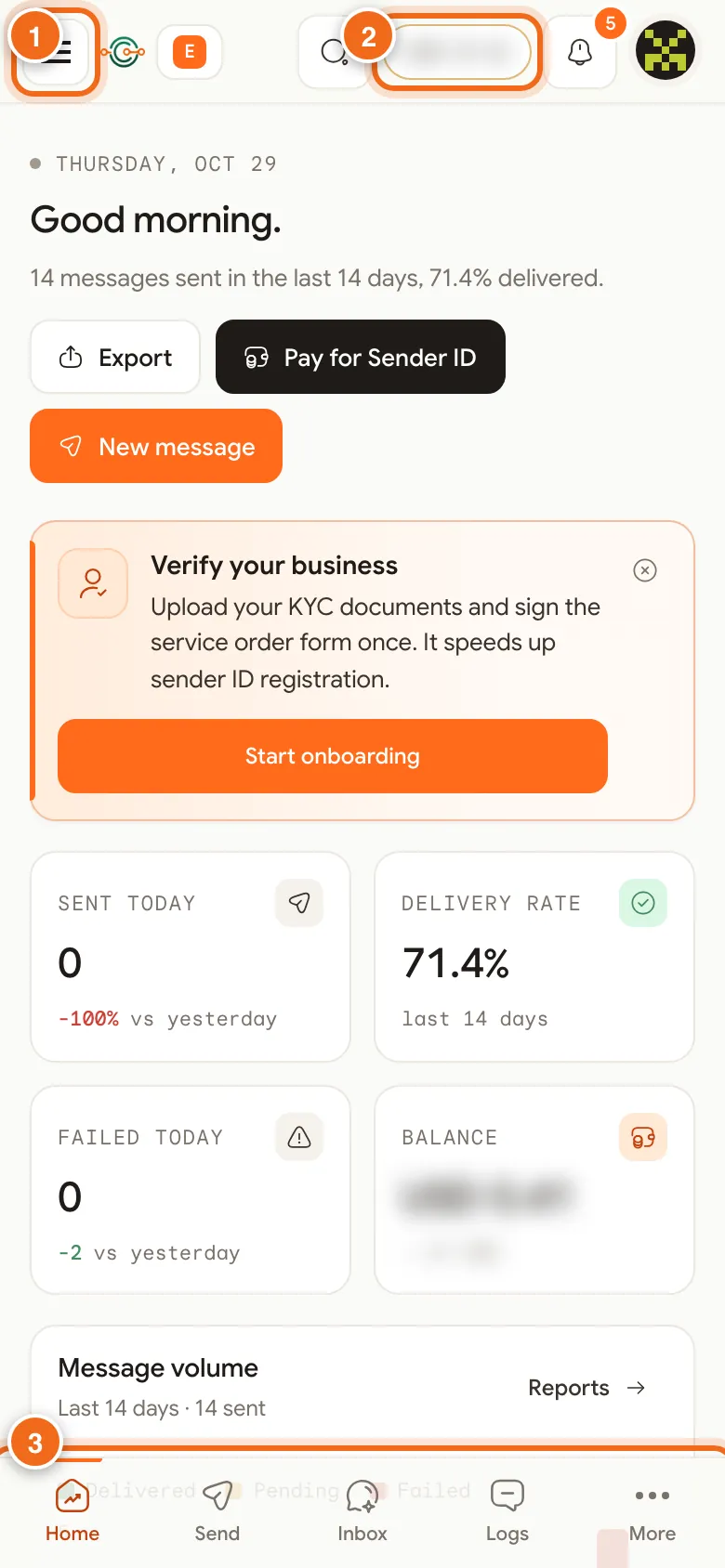
1 Open menu, 2 Balance pill (tap to top up), 3 Bottom bar: Home, Send, Inbox, Logs, More.
Other things at the top of the page
The bell shows notifications, such as a finished campaign or a sender ID decision. EN switches the dashboard language. If you belong to more than one workspace (for example your company and a client), the workspace menu at the top left switches between them. Everything team members do is recorded in the audit log.
Common errors and how to fix them
| What you see | What it means | How to fix it |
|---|---|---|
| Low balance. About N SMS left | Your balance is running out. | Click Top up and add funds by mobile money, Mukuru or crypto. |
| A menu item you expected is missing | Your role in this workspace does not include it (for example Viewer is read-only). | Ask the workspace owner or an admin to change your role in Settings, Team. |
| Overview numbers show 0 | Nothing has been sent today, or you are in a different workspace. | Check the workspace name at the top left, then send a test from Send Message. |
| The page asks you to sign in again | Your session ended. | Sign in again at auth.esmsafrica.io; your data is unchanged. |
Frequently asked questions
Is there a mobile app?
The dashboard works in your phone's browser with a bottom bar for Home, Send, Inbox, Logs and More, so you do not need to install anything.
Where do I see if my messages were delivered?
Open Message Logs from the left menu. Each message has a status such as delivered or failed, and you can open a row for its full timeline.
What does the Delivery rate card count?
It shows the share of messages delivered over the last 14 days.
How do I find a page quickly?
Press Cmd K (Mac) or Ctrl K (Windows) and type part of the page name.
Related guides
Ready? Create a free eSMS account and explore the dashboard yourself.