eSMS SMS billing is prepaid: you top up a wallet and each message is charged from it as it is sent. Your balance and every recent charge, refund and top-up are under Settings > Billing in the dashboard, and your payment history with downloadable receipts is on the Payments tab of your account profile at auth.esmsafrica.io/profile.
Last reviewed: 29 October 2026
How to check SMS billing and download receipts
Open Settings > Billing
In the left menu under ACCOUNT, click Settings, then the Billing tab. Wallet balance shows your balance and about how many SMS it covers. Top up takes you to the payment page, and WhatsApp us opens a chat if you need help paying.
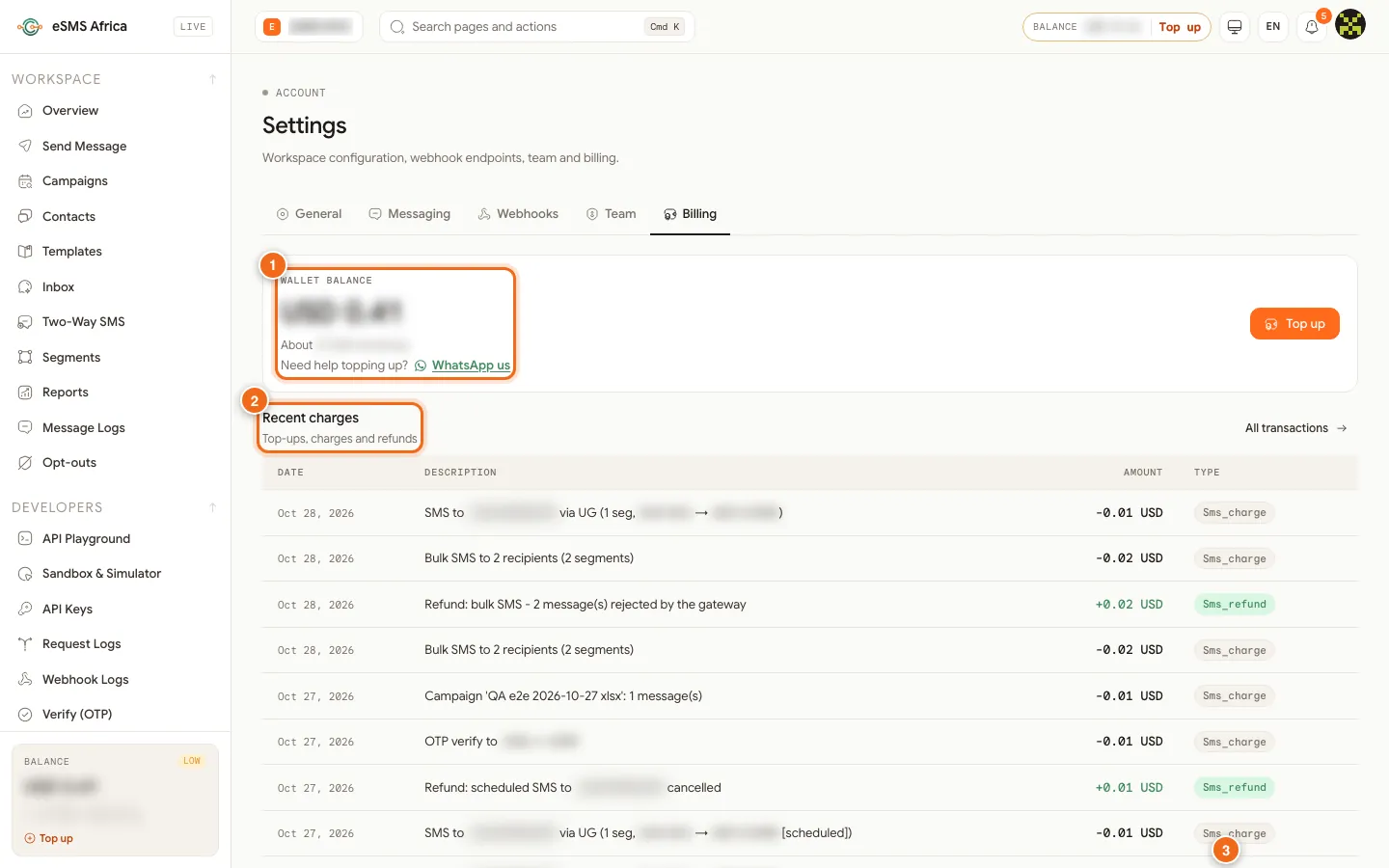
1 Wallet balance with Top up on the right, 2 Recent charges (Date, Description, Amount, Type), 3 the receipts section further down. Read your recent charges
Recent charges lists top-ups, charges and refunds with the date, a description, the amount and a type. You will see types such as Sms_charge (a message or a campaign batch), Sms_refund (money returned, for example "Refund: bulk SMS - 2 message(s) rejected by the gateway" or a cancelled scheduled message) and Credit (a top-up). Single messages show the country, segments and price; campaigns show the campaign name and number of messages.
Open your profile for receipts
Scroll to Receipts & automatic top-up and click Open profile, or go straight to auth.esmsafrica.io/profile and choose the Payments tab.
Download a receipt
Under Payment history ("All transactions across eSMS services") each payment shows the service, date, status and amount. Completed payments have a Receipt link that opens the receipt to view or download. Click Load more for older payments. Payments that were never finished show as expired.
How charges work
- Single messages are charged when you send them, per segment, at your price for that country.
- Campaigns reserve nothing up front. Each batch is charged as it sends. If the balance runs out, the campaign pauses and you are notified; Resume continues where it stopped.
- Refunds are automatic when a message is refused as we hand it to the network, when a Confirming message turns out not to have been sent, and when a scheduled message is cancelled.
- Sender ID fees are charged only when the sender ID is approved. You can also pay them in advance with Pay for Sender ID.
- If your balance is ever negative, your next top-up covers it first, and sending resumes once it is above zero.
Topping up
Top up at auth.esmsafrica.io/topup with mobile money in local currency (Uganda, Rwanda, Kenya, Tanzania, Zambia), Mukuru in the countries it serves (confirmed by our team, usually within a few hours), or crypto, USDT on Tron (TRC20) or USDC, with no fee. The minimum is USD 20 for mobile money and Mukuru, with a 5% service provider fee included in the total shown, and USD 50 for crypto. Automatic top-up is not currently available, so set a low balance alert instead.
Common errors and how to fix them
| What you see | What it means | How to fix it |
|---|---|---|
| Low balance warning in the top bar | Your balance is close to running out. | Click Top up. Set a Low balance alert under Alerts to get warned earlier. |
| A payment shows as expired in Payment history | The checkout was opened but never completed. Nothing was taken. | Start a new top-up. |
| No Receipt link on a payment | Receipts are only issued for completed payments. | Wait until the payment is confirmed. Mukuru and crypto payments are confirmed by our team. |
| Campaign banner "Paused: balance too low" | The wallet ran out during a campaign. | Top up, then click Resume on the campaign. |
Frequently asked questions
Can I pay by card?
No. You can top up with mobile money where available, Mukuru, or crypto (USDT on Tron or USDC).
Is automatic top-up available?
Not at the moment. Turn on the Low balance alert so you know when to top up.
Where do I download an invoice or receipt?
On auth.esmsafrica.io/profile, Payments tab: each completed payment has a Receipt link.
Why was I refunded for some messages?
Messages refused when we handed them to the network, or confirmed as never sent, are refunded automatically. The refund line in Recent charges explains why.
Do team members have their own balance?
No. Everything sent inside a workspace is billed to the owner's wallet.
Related guides
Ready? Create a free eSMS account and top up from USD 20 with mobile money or Mukuru.