The SMS character limit is 160 characters per segment when your message uses only standard GSM-7 characters, and 70 when it contains anything else, such as an emoji. Longer messages are split into segments (153 GSM-7 or 67 Unicode characters each) and joined on the handset. You pay per segment, so the counter in the dashboard matters.
Last reviewed: 29 October 2026
How segments are counted
| Encoding | One segment | Each segment when longer |
|---|---|---|
| GSM-7 (letters, digits, common punctuation) | 160 characters | 153 characters |
| Unicode (emoji, curly quotes, many non-Latin scripts) | 70 characters | 67 characters |
A few GSM-7 symbols, such as € [ ] { } ^ ~ \ and |, take two characters each. One Unicode character anywhere switches the whole message to Unicode.
How to stay within the SMS character limit
Read the counter
Under the message box on Send Message, the counter shows characters, segments, the encoding and how many characters are left in the current segment, for example "96 chars - 1 segment - GSM-7 ... 64 left in segment 1 - 160/seg".
Watch for the Unicode label
If you add an emoji or a special character, the label changes to Unicode (1) and the counter switches to 67 per segment once you pass 70 characters (2). A warning under the box names the character that caused it and says segments now hold 70 characters instead of 160, so each message costs more.
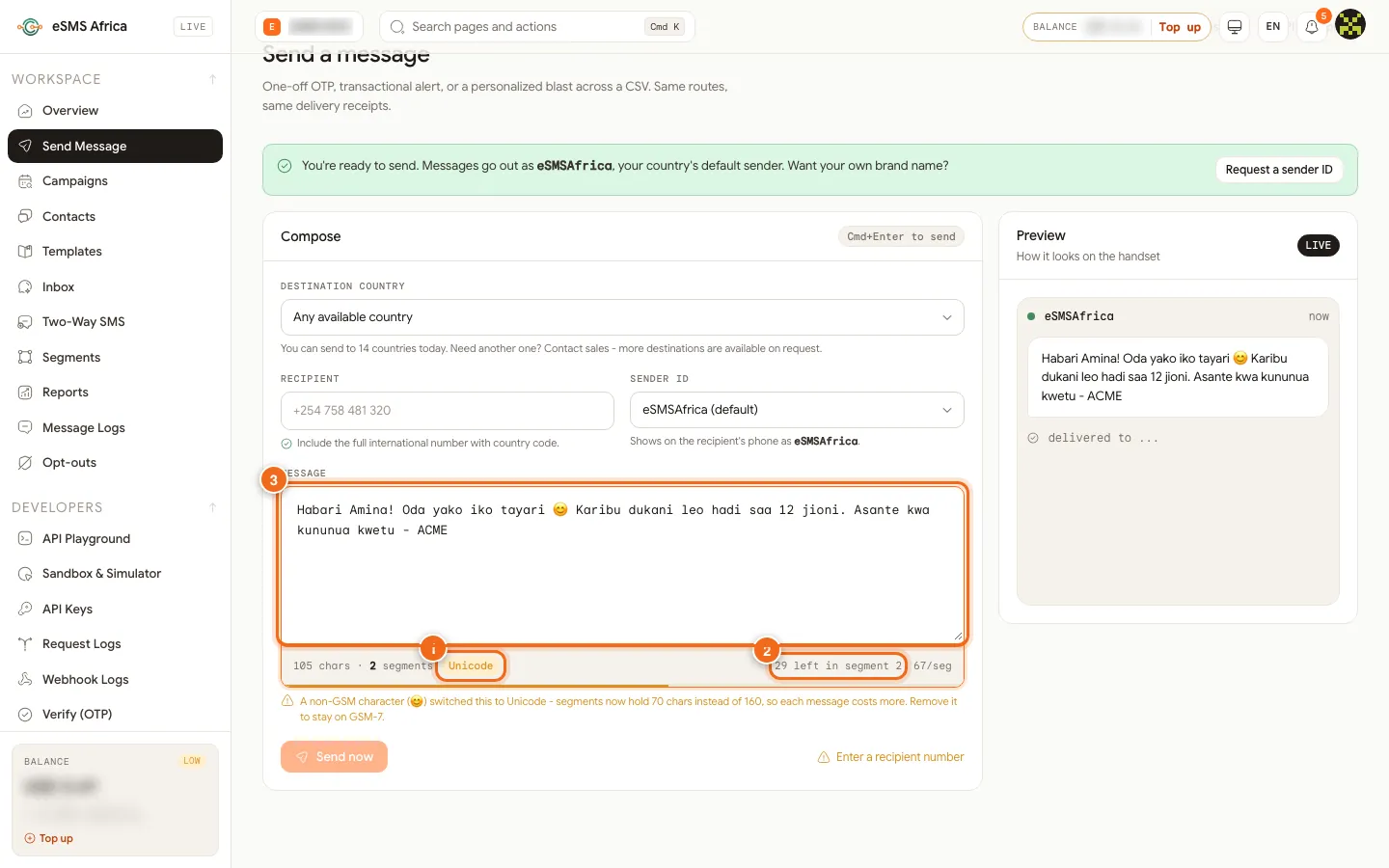
1 Unicode indicator, 2 Counter: left in segment 2 at 67 per segment, 3 The message with an emoji. Remove or replace the character
Delete the emoji, or swap curly quotes and long dashes for straight quotes and a hyphen. The label returns to GSM-7 and the segment count drops.
Check personalised messages
In the campaign wizard, merge fields change the length per person. The counter shows the template, and Longest shows the biggest real message. When a message switches to Unicode the wizard lists the characters with a suggested GSM-7 replacement.
Confirm the cost before sending
On the wizard's Review & send step, the Cost by country table shows segments, price per segment and total cost for every country.
A worked example
A 150-character reminder in plain English is 1 segment. Add a smiley at the end and it becomes Unicode: 151 characters at 67 per segment, so 3 segments, three times the cost for one emoji. Remove the smiley and it is back to 1 segment.
Common errors and how to fix them
| What you see | What it means | How to fix it |
|---|---|---|
| A non-GSM character (...) switched this to Unicode | One character changed the encoding. | Remove it or replace it with a plain equivalent to stay on GSM-7. |
| Unicode: 70 characters per segment instead of 160 | The wizard found Unicode characters in your text. | Apply the suggested replacements shown under the warning. |
| Cost higher than expected | The message runs to more segments than you thought. | Check the counter and the Longest message on the review step. |
| Message looks cut off on an old phone | Very old handsets may show long messages in parts. | Keep important information in the first 160 characters. |
Frequently asked questions
How many characters can one SMS have?
160 GSM-7 characters or 70 Unicode characters. Longer messages are split into segments of 153 or 67.
Do emojis cost more?
Yes, usually. An emoji switches the message to Unicode, so each segment holds fewer characters and you may pay for more segments.
Do spaces count?
Yes. Spaces and line breaks count as characters.
Is a long message delivered as one SMS?
On most phones the segments are joined and shown as one message, but each segment is billed.
Related guides
Ready? Create a free eSMS account and watch the live counter as you type.