Your eSMS account only sends to the SMS countries you switch on. Open Countries in the dashboard, open a Live country card and click Enable; from then on you can send there. This deny-by-default rule protects your balance if a number or a login ever falls into the wrong hands.
Last reviewed: 29 October 2026
How to switch on SMS countries
Open Countries
In the left menu, under INFRASTRUCTURE, click Countries. The cards at the top count Markets, Live now, OTP ready and Two-way.
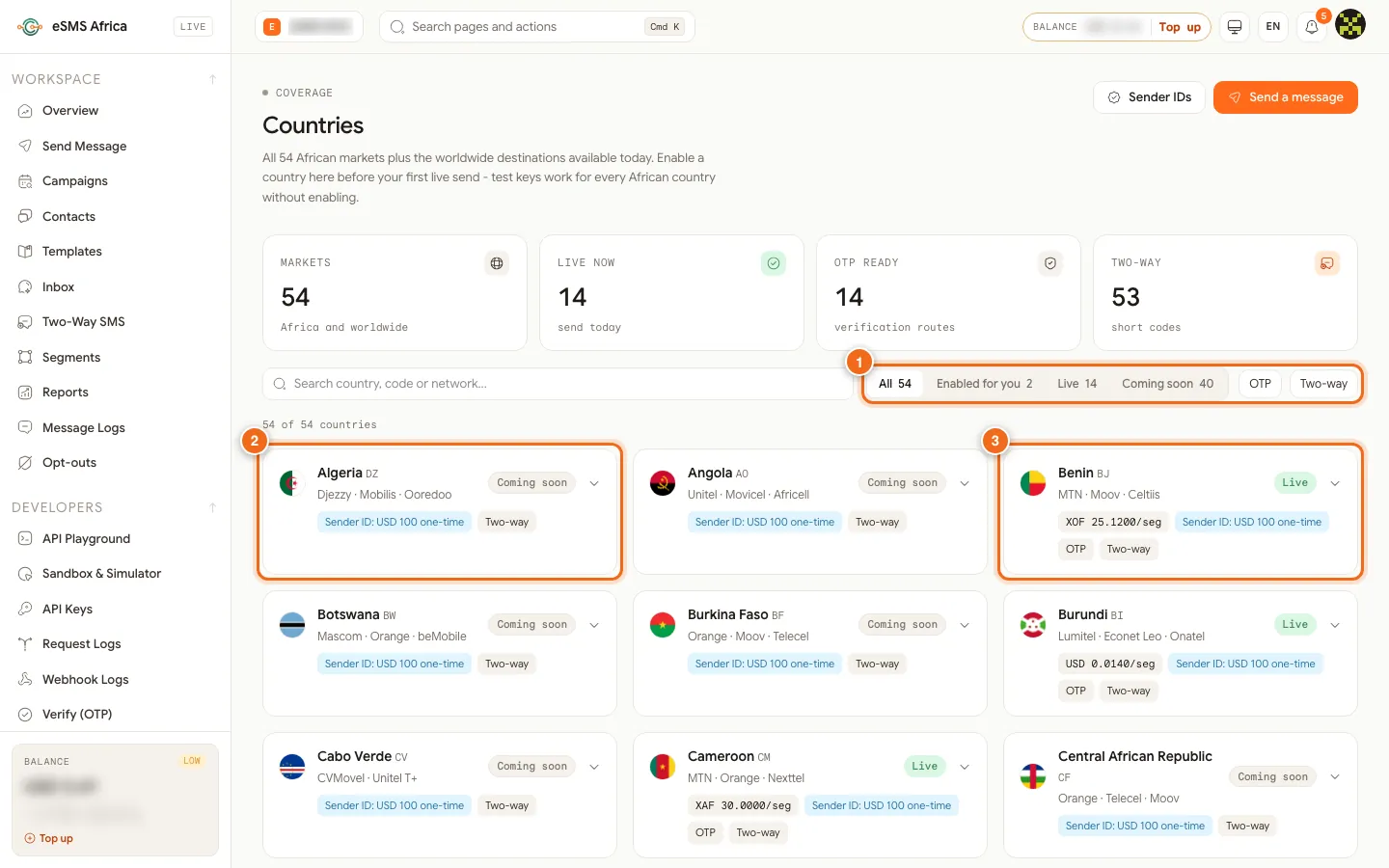
1 Filters: All, Enabled for you, Live, Coming soon, OTP, Two-way, 2 A Coming soon country, 3 A Live country with its price per segment. Filter the list
Use the filters (1): Enabled for you shows what you can already send to, Live shows countries open for sending today, and Coming soon shows countries that are not open yet. You can also type in Search country, code or network.
Open the country card
Click a Live country (3). The card opens to show its Networks, Regulator, Sender ID fee, Notes and Compliance rules, such as hours when promotional SMS is allowed. Read these before your first send.
Click Enable
Click Enable followed by the country name (2), for example Enable Ghana. A message confirms the country is enabled and you can send there now. The card then shows an Enabled pill, a Disable button and a Send to button.
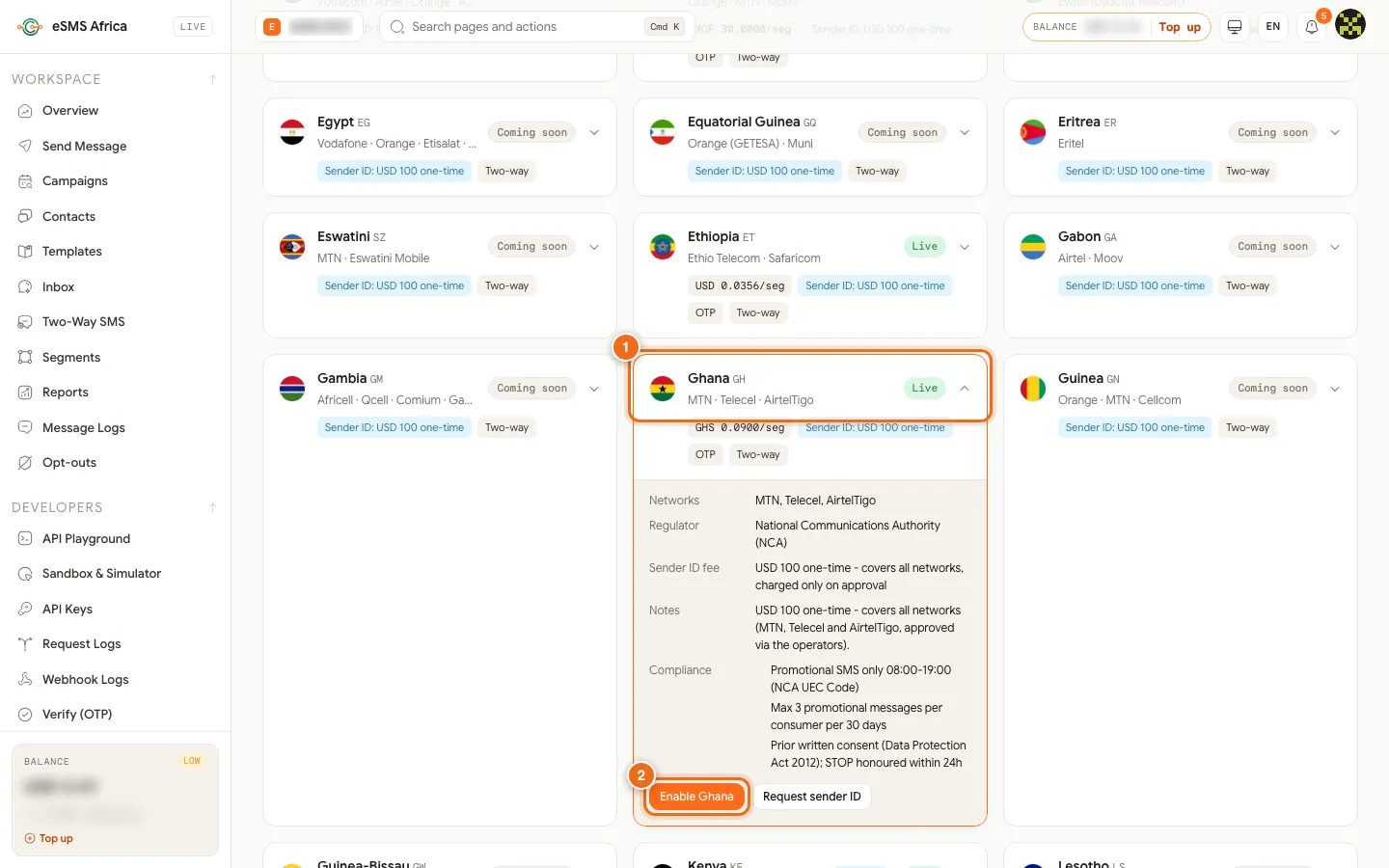
1 The opened country card, 2 Enable Ghana (Request sender ID is next to it). Send your first message
Click Send to on the card, or open Send Message. If you want your own brand name instead of the default sender, click Request sender ID on the same card.
Common errors and how to fix them
| What you see | What it means | How to fix it |
|---|---|---|
| country_not_enabled ("Sending to ... is not enabled for this account yet") | You sent to a country that is not switched on. Nothing was charged. | Open Countries, open that country and click Enable, then send again. |
| destination_unavailable | The country is Coming soon, so live sending is not open yet. Nothing was charged. | Wait until the card shows Live, or contact sales. |
| country_needs_approval | Destinations outside Africa need our approval first. | Contact sales or support to ask for the destination. |
| Disabled for this account - contact support | Our team has blocked this country on your account. | Contact support to discuss it. |
| Could not update the country | The change did not save, or your role cannot change countries. | Ask the Owner or an Admin, or try again. |
Frequently asked questions
Why must I enable a country before sending?
Every account is deny-by-default, so a stolen password or a wrong number list cannot spend your balance in countries you never use.
Does enabling a country cost anything?
No. Switching a country on is free and needs no approval for African countries. You pay only for messages you send.
How many countries can I send to?
The Live now card on the Countries page shows how many countries are open today, and each card says Live or Coming soon.
Who can enable countries?
The workspace Owner and Admins, from the dashboard only.
Can I see the price before I enable?
Yes. Each Live card shows its price per segment, and the full list is on the pricing page.
Related guides
Ready? Create a free eSMS account, switch on your countries and send your first SMS.