Your SMS account sign up takes a few minutes: open the eSMS registration page, enter your name, email, phone number and a password, then type the 6-digit code we email you. That one code confirms both your account and your phone number, and you land in the SMS dashboard ready to top up and send.
Last reviewed: 29 October 2026
How to complete your SMS account sign up
Open the registration page
Go to auth.esmsafrica.io/register. The page title says Create your account and the box at the top says you are signing in to SMS Platform. One eSMS account works across all our products, so you only sign up once.
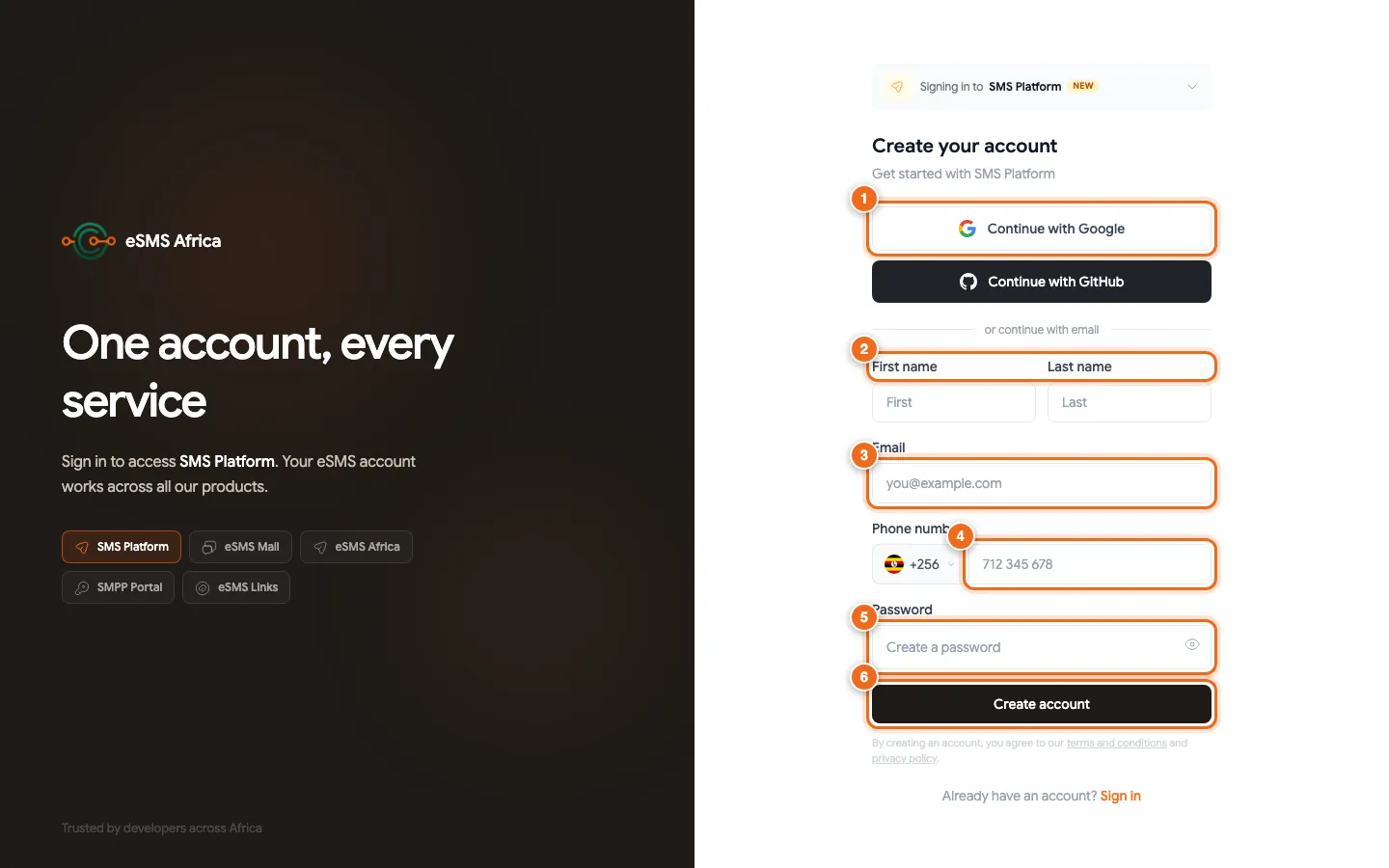
1 Continue with Google (GitHub below it), 2 First and last name, 3 Email, 4 Phone number with country code picker, 5 Password, 6 Create account. Choose Google, GitHub or email
Click Continue with Google or Continue with GitHub to use an account you already have, then follow the on-screen steps. To sign up with your email instead, carry on with the form under or continue with email.
Fill in your details
Type your First name and Last name, your Email, and your Phone number. Pick your country from the code picker on the left of the phone box (for example +256 for Uganda) and type the rest of the number. Then choose a Password; the eye icon shows what you typed.
Click Create account
Click Create account. By doing this you agree to the terms and conditions and the privacy policy linked under the button.
Enter the 6-digit code
The next page says Verify your account: "We emailed a 6-digit code to" your address. Open the email, then type the code into the six Verification code boxes (pasting the whole code also works) and click Verify account. When you see Account verified, you are taken through to the dashboard.
Resend the code if it does not arrive
Check your spam or promotions folder first. If the email is not there, click Resend code under Didn't get the code?. After a resend you see "Sent - check your inbox." and a short countdown before you can ask again.
What happens after you verify
Once verified you can open the dashboard at sms.esmsafrica.io. Three quick things get you to your first live message: add balance on the top-up page, check that your destination country is switched on in Countries, and send a test to your own phone from Send Message. Verified accounts get a default sender ID for their home country with no approval needed, so you can send straight away.
Common errors and how to fix them
| What you see | What it means | How to fix it |
|---|---|---|
| Phone number is required | The phone box was left empty. | Pick your country code and type your number. |
| Enter a valid phone number / Invalid phone number | The number does not match the country code you chose. | Check the country in the picker and type the number without the leading 0, for example 712 345 678. |
| Enter the 6-digit code from your email. | Some of the six boxes are empty. | Type or paste all six digits, then click Verify account. |
| That code could not be verified. | The code is wrong or no longer valid. | Check the latest email (a resend replaces the old code) or click Resend code. |
| Could not resend the code. Please try again shortly. | The resend request did not go through. | Wait a minute and click Resend code again. |
Frequently asked questions
Is it free to create an eSMS account?
Yes. Creating an account costs nothing. You only pay for the messages you send, from balance you add on the top-up page.
Can I sign up with Google instead of a password?
Yes. Click Continue with Google or Continue with GitHub on the registration page and follow the steps shown.
Why do you need my phone number?
It sets your home country for the default sender ID and is where test messages go. The email code confirms both your account and your phone number.
I already have an eSMS Mail or Links account. Do I need a new one?
No. One eSMS account works across all our products. Click Sign in on the registration page and use your existing details.
Related guides
Ready? Create a free eSMS account and send your first message today.