To send SMS online with eSMS, open Send Message, stay on the Single tab, enter the full international number, write your message and click Send now. The live preview shows how it will look on the handset and the counter tells you how many segments you will pay for before you send.
Last reviewed: 29 October 2026
How to send SMS online to one number
Open Send Message
Click Send Message in the left menu or New message on Overview. The Single tab (1) is selected. A green banner confirms you are ready to send and names your default sender.
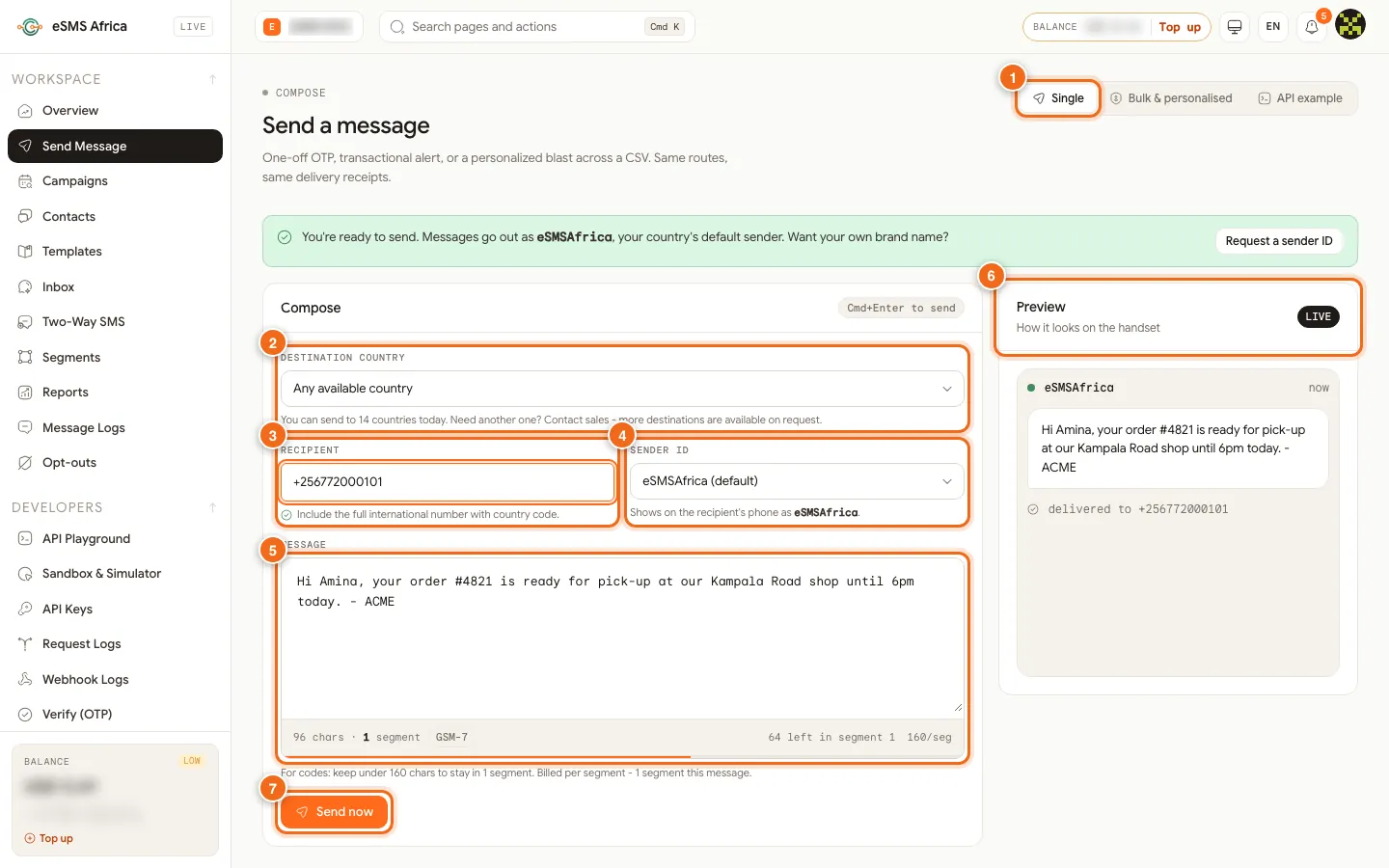
1 Single tab, 2 Destination country, 3 Recipient, 4 Sender ID, 5 Message box with counter, 6 Preview, 7 Send now. Choose the destination country
Destination country (2) defaults to Any available country. The note under it says how many countries you can send to today.
Enter the recipient
In Recipient (3), type the full international number with the country code. Local formats like 07xx are not accepted here.
Pick the sender ID
Sender ID (4) shows eSMSAfrica (default) until you have your own approved sender IDs, which then appear in the same list. The line below shows the name the recipient will see.
Write the message
Type in Message (5). The counter shows characters, segments, the encoding (GSM-7 or Unicode) and how many characters are left in the segment. On a phone the same counter sits under the box.
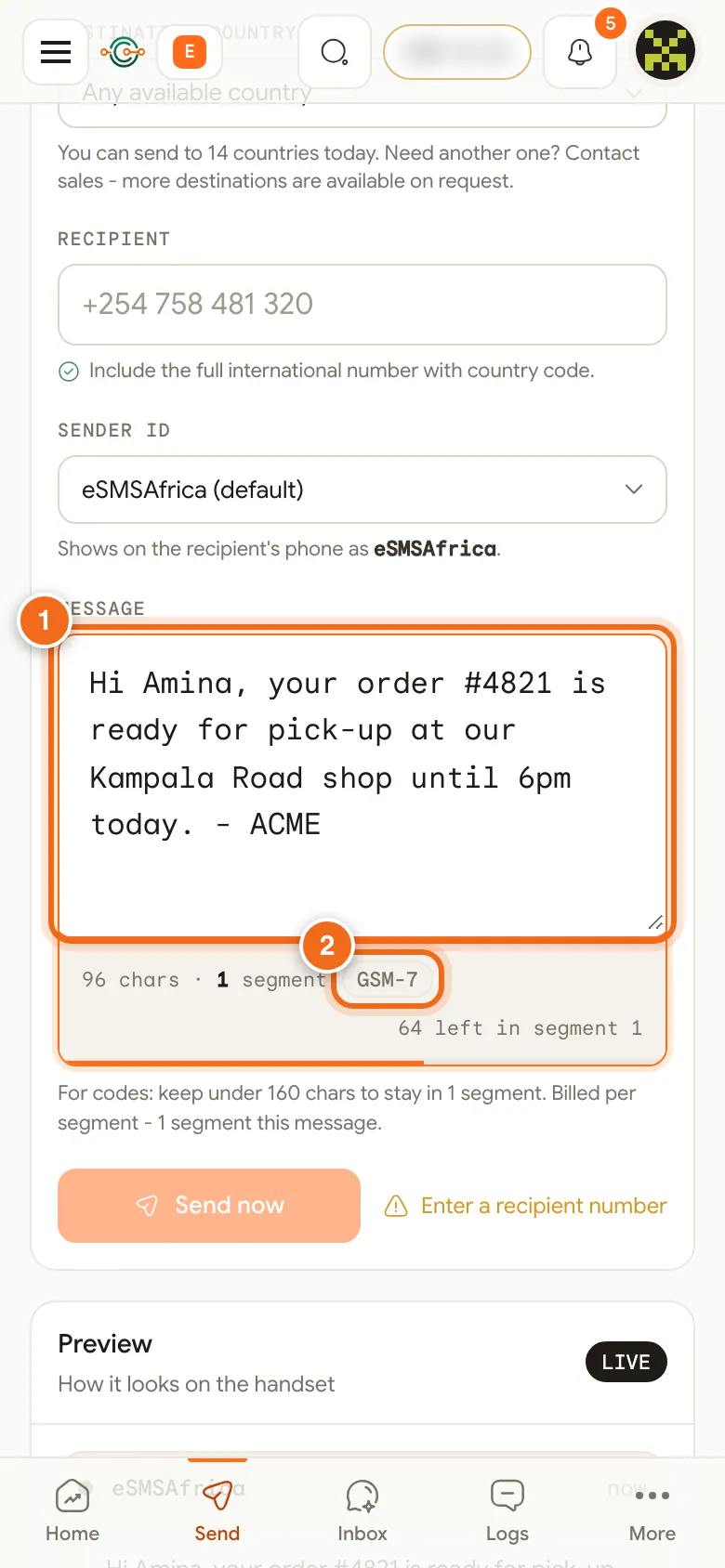
1 Message box on a phone, 2 GSM-7 encoding indicator. Check the preview and send
The Preview (6) shows how the SMS looks on the handset. Click Send now (7), or press Cmd+Enter (Ctrl+Enter on Windows). A confirmation shows the status, segments and cost, and your balance updates.
Check delivery
Open Message Logs to follow the message from submitted to delivered. Click the row for its full delivery timeline.
What it costs
You pay per segment at the price of the destination country, and the confirmation after sending shows the exact cost. Each Live country card on the Countries page shows its price per segment, and the pricing page lists every country. If a message is rejected by the network it is refunded automatically.
Common errors and how to fix them
| What you see | What it means | How to fix it |
|---|---|---|
| Include the country code (e.g. +254, +256) - local numbers like 07xx are not supported | The number has no country code. | Type it in international format, for example +256 772 123 456. |
| Enter a recipient number | The Recipient box is empty. | Type the number, then send. |
| country_not_enabled | The number's country is not switched on. Nothing was charged. | Open Countries, enable the country, and send again. |
| sender_not_approved | The chosen sender ID is not approved for that country. | Pick the default sender or wait for approval. |
| Insufficient balance | Your balance does not cover this message. | Top up, then send again. |
| Status failed in Message Logs | The network rejected the message. | Check the number. Messages rejected by the network are refunded. |
Frequently asked questions
How much does one SMS cost?
It depends on the country and the number of segments. Each Live country card shows its price per segment, and the pricing page lists every country.
Can I send to a number in another country?
Yes, if that country is live and switched on for your account in Countries.
Why is my message 2 segments?
It is longer than 160 GSM-7 characters, or a special character switched it to Unicode (70 per segment). The counter shows which.
Can I send to several numbers at once?
Yes. Use the Bulk & personalised tab, which opens the campaign wizard for files, pasted numbers and contact groups.
Where do I see the cost after sending?
In the confirmation message, in Message Logs and in Settings, Billing under Recent charges.
Related guides
Ready? Create a free eSMS account and send your first SMS online in minutes.